Principal
Principal is a medium difficulty Linux box. The box involves a JWT exploitation to get authenticated access to API endpoints, which leads to remote access. With remote access, enumeration of the box shows there is a misconfiguration in a custom sshd config file and an unencrypted certificate authority that allows root access.
Hello! It has been almost two months since I posted, due to me being busy with the HTB Academy and other things. Today we are talking about Principal; this box was pretty easy for the most part, although due to my lack of experience with certificates I did have to get some help on the last portion.
Contents
Tools Used
nmap – Network mapping tool, used to enumerate a device.
ffuf – A web fuzzing tool to quickly enumerate websites using wordlists.
feroxbuster – A web content discovery tool. This is very similar to ffuf, not quite as flexible but it is faster.
hydra – A tool for brute-forcing password attempts through many different protocols.
BurpSuite CE – HTTP proxy with tools built in for penetration testing.
nmap scan
The initial nmap scan shows two TCP ports, port 22 and 8080. Port 22 shows that it is running OpenSSH 9.6p1 Ubuntu, and port 8080 reports a Jetty (http) instance with pac4j-jwt/6.0.3 as the “Powered-By” header.
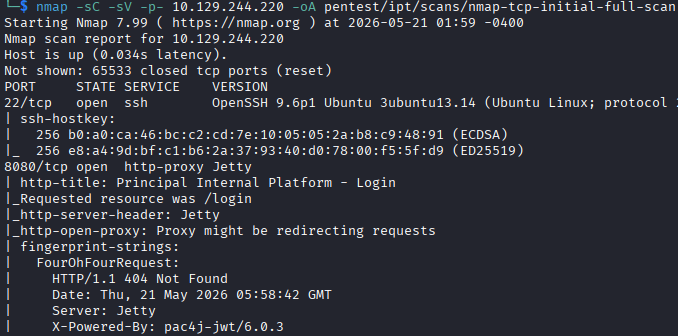
Upon accessing the website via IP, it immediately redirects to /login, and makes an API call to /api/auth/jwks which returns a RSA public key. The website looks like some kind of platform for managing IT operations that is aimed at corporate customers.
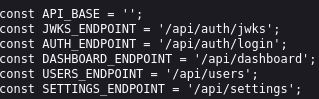
I run feroxbuster, which enumerates a few URLs that either give a 500 error or do not lead anywhere. I look through the source code of the page and look at the /static/js/app.js script that is loaded, and it provides information about API endpoints. These endpoints are not accessible and show “unauthenticated” when attempting to reach them with no login.
JWT Exploitation
I search the version of pac4j-jwt and find that it is vulnerable to CVE-2026-29000, which is an authentication bypass vulnerability based on faulty programming logic. The vulnerability exists when an attacker provides a JWE (encrypted JSON Web Token) encrypted with the site's public key that has an inner PlainJWT (unsigned token), the server decrypts the token and does not enforce signature verification if the inner JWT is a PlainJWT.
There is a PoC available from github user alihussainzada here. The PoC pulls the public key from /api/auth/jwks, creates a plain JWT with the desired role and username, encrypts it using the public key and provides the header needed to authenticate as the desired user.
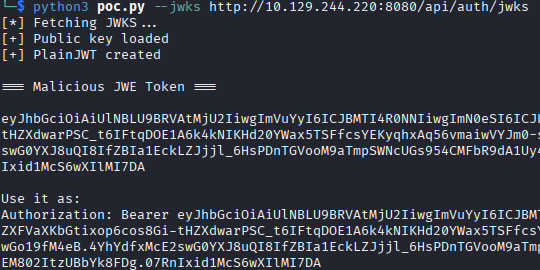
With the token provided by the server using the authentication bypass, I am able to send it as a header and authenticate to the API endpoints to enumeration some information. Since we are looking at API endpoints, you can add the header to a cURL request easily, but I end up just using Burp Suite to intercept my GET requests and insert the header into them that way.
The /api/dashboard endpoint contains a list of login attempts, which we can grab usernames from, and some information such as rotation of SSH keys. I add the usernames to a username_web.list file for easy password spraying.
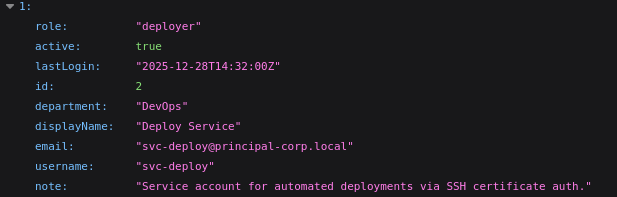
The /api/users endpoint has a list of all users and their roles. Some interesting things to note here is the service account svc-deploy with the role deployer that contains the note “Service account for automated deployments via SSH certificate auth.”, and that the domain is principal-corp.local.
Finally, the /api/settings endpoint contains information about the system itself and the encryption key being used. My initial thought is to try to authenticate as the svc-deploy account using the same PoC we just used and see if we can assign SSH keys. I don't attempt to login as svc-deploy after checking /static/js/app.js and seeing there is no role for deployer, so it has no additional access that my ROLE_ADMIN has with the current token. In a “real” environment this might have been a means of access by generating SSH keys but here it seems like that part is not developed. I add the password to a passwords_web.list file for easy password spraying.
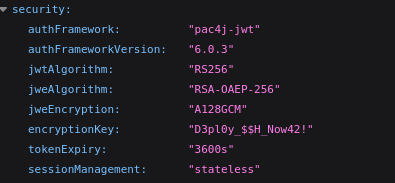
I suspect svc-deploy has the same password as the encryption key, but to be thorough I run hydra against SSH using the full list of usernames I scraped from the API endpoints. svc-deploy comes back as having the password that is the same as their encryption password.

The credentials work, and we get in via SSH. The next step is enumeration of the box and looking for privilege escalation pathways.
Privilege Escalation
A few things come up during user enumeration:
1. svc-deploy is part of the deployers group, which we need to enumerate now.
2. There are no other users on the box, so we're not looking to move laterally.
3. The svc-deploy user does not have any sudo privileges.

I see the pieces, but my inexperience with certificates causes me to have to look up how I can use these misconfigurations for privilege escalation.
First, I'll lay out the critical pieces that you would enumerate:
1. Viewing 60-principal.conf sshd config shows that root logon is set to prohibit-password, which means we can login using a certificate as root.
2. I did not notice this but it is mentioned elsewhere, TrustedUserCAKeys is set without an AuthorizedPrincipalsFile. This means that any certificate signed by the trusted CA is accepted, and that the principal listed in the certificate is matched against the username being logged into.
3. We have read access to the ca file, which is the private key for the trusted CA.
The escalation path looks like this:
1. Generate a new certificate.
2. Sign the certificate using the CA's private key, which we have read access to.
3. During signing, specify the principal on the certificate as root.
With the certificate signed, we can use it to SSH to the box as root and grab the flag.
Lessons Learned
This box was very short but felt fun and taught me more about JSON Web Tokens, certificates, and more about how to use openssl. I'm slightly embarrassed I had to look up that I needed to generate and sign certificates using the CA, but that is what learning is about and being embarrassed about that kind of stuff will only hold you back.