Scrambled
Scrambled is a medium difficulty Windows box. The box involves enumerating a website for credentials, using those credentials to move laterally a couple times for additional access, then take advantage of weak serialization to catch a shell as SYSTEM.
This box was a fun challenge since you're required to use exclusively Kerberos for authentication, since NTLM is disabled on the domain. Using only Kerberos required me to remember and re-evaluate what I had learned in Hack the Box (HTB) Academy before on how to interact with a domain using Kerberos on Linux. The weak serialization was a new attack I had seen but not done before, but ended up being very straightforward in hindsight.
Contents
- Tools Used
- nmap scan
- Initial Enumeration
- Kerberos Authentication for TGT
- Authenticated Enumeration
- Lateral Movement
- Privilege Escalation
- Lessons Learned
Tools Used
nmap – Network mapping tool, used to enumerate a device.
evil-winrm – A shell to interact with the WinRM protocol originally, but now works with PSRP, the PowerShell equivalent.
impacket – A collection of tools, although I specifically used ticketer and mssqlclient, which allows you to maliciously interact with a Windows system.
hashcat – Hash cracking program.
certipy – A program for primarily interacting with AD Certificate Services, but has other uses as well.
dsacls – A program native to Windows for enumerating AD ACLs.
smbclient – Part of the Samba Suite, this program allows you to interact with SMB shares from Linux.
netcat – Network utility that has many uses. For this box, I use it to test if ports are open when I don't want to wait for an nmap scan.
ktutil – A program for generating keytab or Kerberos V4 srvtab files.
kinit – A program for obtaining a ticket-granting ticket.
realm – A program for interacting with a Windows Active Directory (AD) domain.
krb5-user – A package of tools for interacting with Kerberos.
klist – A tool for listing the Kerberos principal and Kerberos tickets held in cache, or keys held in a keytab file.
ilSpycmd – A frontend for ILSpy, a program for decompiling .NET programs.
nmap scan
nmap shows quite a few ports open on this box. The normal Windows Domain Controller (DC) ports are open such as DNS, LDAP, SMB, Kerberos, WinRM, etc.
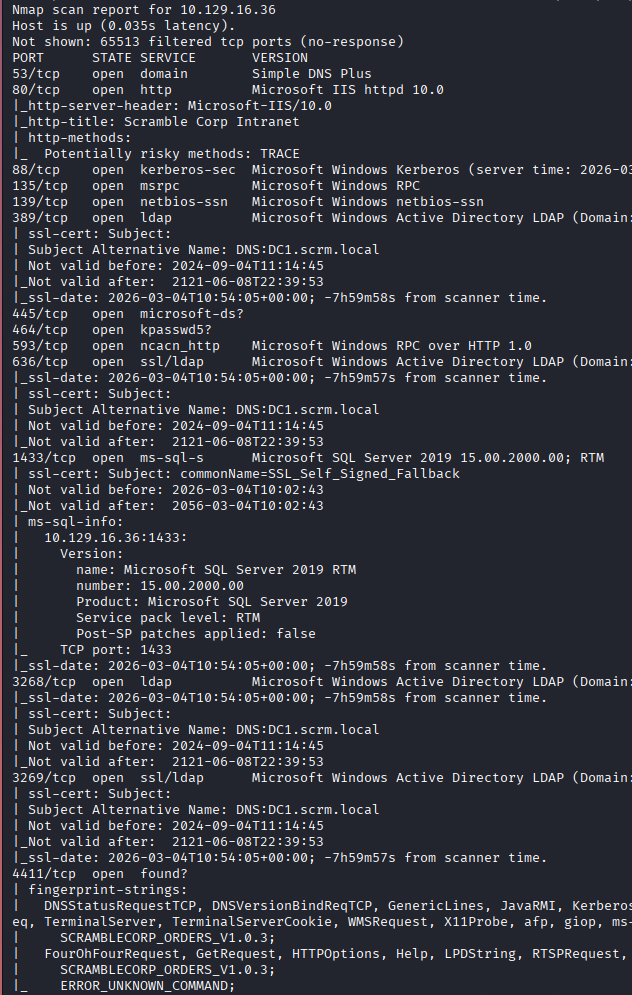
We also see port 80 (HTTP) is listening, port 1433 (MSSQL) is listening, port 4411 is listening which after a cursory google search say it might be “Found Messaging Protocol” which is something I've never heard of, finally port 9389 is listening which might be for Active Directory Web Services. The domain is scrm.local, with the hostname being DC1.
We have a lot to work with and a lot to enumerate.
Initial Enumeration
I check SMB shares, it doesn't appear that they allow Guest or null authentication sessions.
I think my best chance to get some credentials is by enumerating the website on port 80.
The website lists its an intranet for Scramble Corp, it has some stats and a page for IT Services. The IT Services page lists that NTLM authentication is disabled due to a recent breach.
Because NTLM is disabled, the ways I'm used to authenticating are not going to work; however, I am prepared because I've done the “Password Attacks” module on HTB Academy which goes into depth on interacting with Kerberos from Linux.
To authenticate to Kerberos, I need a keytab file. A keytab file stores long-term keys that allow authentication to Kerberos, which will provide a ccache file as long as my authentication remains valid. In order to communicate with the Kerberos Key Distribution Center (KDC), I need to configure realm and add the domain and realm to that. It is important to note that while these concepts are similar in function, domain and realm, they are two separate systems so do not think of them as placeholder names. The realm is the Linux system, and based on its configuration file it talks to a domain it is mapped to.
The domain is scrm.local, so our realm will be SCRM.LOCAL. When referencing either of these two things in this post, the realm will be in all capital letters, SCRM.LOCAL, and the domain will be in all lowercase, scrm.local.
In order to configure the realm, I needed to install realm and krb5-user from the repository. Once installed, I edited /etc/krb5.conf to add the realm.
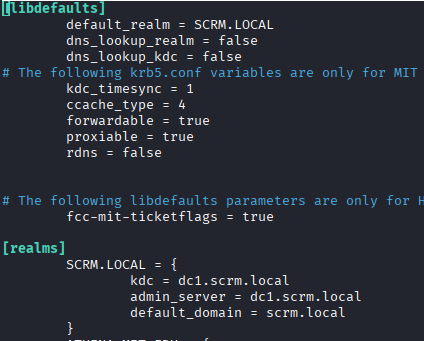
I added SCRM.LOCAL as the default realm, and added the options under “realms” down below that. It is important to have both the domain and the hostname in your /etc/hosts file.
Down towards the bottom there is a section titles “domain_realm” that ties the domain and realms together.
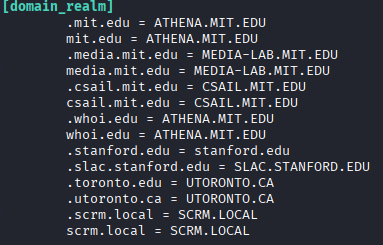
With these options added, I can now contact the KDC, but first I need a keytab file. I'm going to describe this process very verbosely because this is a learning opportunity for me to straighten out the process, and it might be for you as well.
I take the username I discovered above, ksimpson, and knowledge of their password reset policies, that they put the username as the password on reset, and make a keytab file with these credentials (not knowing if it will authenticate or not yet).
In a real-world situation, you could likely do some social engineering to leave a voicemail for the password reset as they request, but for this box the password is already reset.
Kerberos Authentication for TGT
With the credentials, we create the keytab file using ktutil. Launching this problem brings me to a separate command line, where I can enter the specifics of the credentials.
ktutil
I need to stress here that is is very important that you notate the REALM, which if you're following along will be in ALL CAPS, if you do not, then this keytab file will not work.
addent -password -p ksimpson@SCRM.LOCAL -k 1 -e RC4-HMAC
This will then prompt for the password for ksimpson, which we think is the same as the username from the password reset.
wkt /home/username/Scrambled/ksimpson.keytab
This writes the keytab to the path listed. Using the ~ for your home directory doesn't work here so make sure you have the full path without it.
I check the keytab file with klist and verify that it looks correct:

I have two keytab files here, one where I did not capitalize the realm correctly (top one) and was getting errors when attempting to use it. When attempting to use that file the error I was getting was “kinit: Cannot find KDC for realm scrm.local while getting initial credentials.” Its stating that the realm scrm.local is not configured with a KDC, which is correct because the realm I have configured is SCRM.LOCAL.
With my keytab file, I can attempt to get a ccache file (authenticate to Kerberos) with kinit. kinit will request the user's Ticket Granting Ticket (TGT) and store this ticket in the ccache file, which for me by default is /tmp/krb5cc_1000.
kinit ksimpson@SCRM.LOCAL -k -t ~/Scrambled/ksimpson..keytab
This will attempt to authenticate to Kerberos using the keytab file and generate a TGT for the user. If any errors come up, its likely that you didn't capitalize the realm somewhere.
I verify I have the TGT with klist, this lists what services are authenticated. In the screenshot below I just have the TGT.
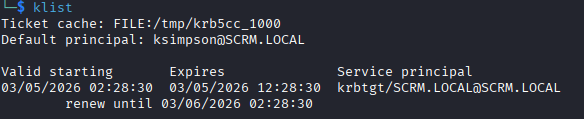
To show an example of what a bad authentication looks like, with incorrect password we would get an error during kinit that the credentials are incorrect.
I generated a new keytab file with an incorrect password and attempted to authenticate.

I'll clear this out by deleting the keytab file. If you want to clear an authenticated session, you can delete the /etc/krb5cc_1000 file.
Here is a list of every step I took:
1. Find username and likely credentials (screenshot on webpage, password reset policy).
2. Install krb5-user, realm, kinit, klist, ktutil.
3. Configure /etc/krb5.conf with the realm and domain, paying close attention to capitalization of the realm.
4. Generate keytab file using ktutil.
5. Authenticate to Kerberos using kinit to get TGT.
Authenticated Enumeration
Finally, with an authenticated user, I can start enumerating.
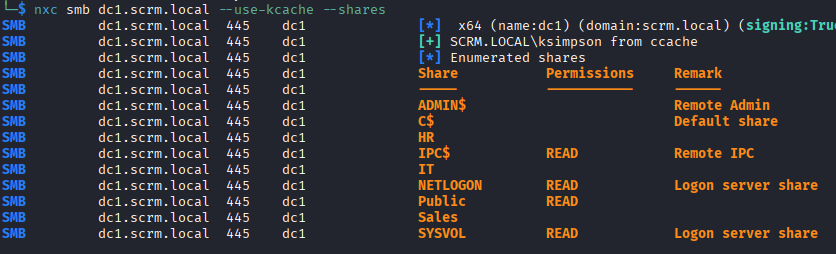
I first enumerate the SMB shares as ksimpson, although this doesn't provide much besides a PDF detailing some changes they made after the compromise. This PDF might be helpful later.
I start enumerating LDAP as well to see what other users exist on the domain, and accounts that may be vulnerable. I add the users to my usernames.list, and enumerate the password policy, which has no threshold so there is no chance of account lockout.
I see some interesting accounts that may be service accounts in the list, so I kerberoast them and get a hit on sqlsvc, likely the MSSQL service account. I plug this hash into hashcat and it returns the password of the service account.

Lateral Movement
Using the same method listed above with ktutil, I generate a keytab file and authenticate as sqlsvc to the domain.
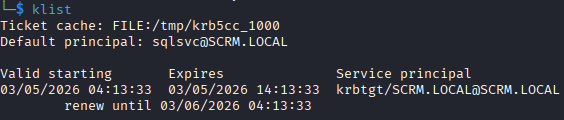
I attempt to authenticate to the MSSQL database as sqlsvc using the kcache that we generated from kinit, but I keep getting an error “KDCERRWRONG_REALM”.
Since I cannot get a TGS from Kerberos for this, I'll make one myself with the Impacket script ticketer.
I grab the domain SID, get the NTLM hash of the sqlsvc password, and generate the TGS but as Administrator, because why not.
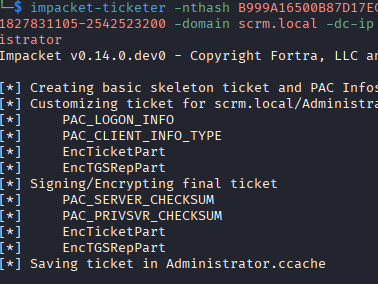
I export this to my KRB5CCNAME variable and connect using Impacket's mssqlclient, which lets me in.
In the database, I enumerate the data in there and find additional credentials for the miscsvc account we saw before.
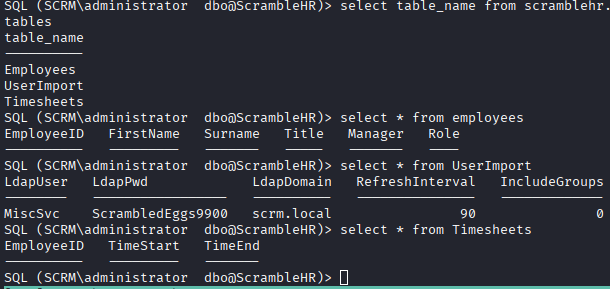
With access to the database as administrator, I can read the flags, but we want to get full control over this machine. I grab both flags and continue.
I enumerate the miscsvc user and do not find anything relevant, I checked DACLs, certipy, BloodHound, and don't find anything. The miscsvc user has access to the “IT” share, which contains an executable and a DLL file for the Sales Order Client application, but without a Windows PC setup to run it I do not pursue this, initially. I briefly tried to get WINE to work, but had no luck at all.
Privilege Escalation
I look over the DLL file using ilSpycmd and see some of the commands that can be sent over the port to the service. I connect using netcat and attempt to logon, but I can't get the logon function to work; however, it doesn't seem that you even need to logon to communicate with the server. I send the LIST_ORDERS command and get back what looks like base64 encoded information.
I end up stopping at this point, assuming I needed to use the executable to get further, and checked the walkthrough to see what the privilege escalation path is. The rest of the attack involves, according to the walkthrough, pouring over the DLL and finding an account that does not need password authentication, using that account to login to the program to generate a log file, identify the weak serialization and exploit it by sending data to call another program on the computer, ideally netcat or a shell.
What I ended up doing was downloading the ysoserial.net program that they mention in the walkthrough, generating the payload using it, and sending that via the listening port 4411 using the SEND_ORDER command, then having the running service call netcat to initiate a reverse shell as SYSTEM. I wouldn't have gotten to this far even with using the executable.
Lessons Learned
This box was fun because it was a change of pace in dealing with an AD domain. I believe more modern deployments of AD have NTLM turned off by default, so getting used to using Kerberos is a good thing. This box involved exploiting weak serialization, which I spotted, but I had no idea how to exploit. I'll be looking for more information in understanding these types of attacks in the future.